Improving the trees dataset
In this document we explore and improve the trees dataset treesdb
Scope
- load the trees database from a pg_dump
- explore the data
- add a primary key
- improve the column types
- find trees with anomalies
- activate earthdistance extension
- find closest trees given a location with earthdistance
- dump the database as sql
The trees dataset
The raw version of the dataset is available from the Paris Open data portal
This includes street trees (along roads), those in green spaces and municipal public facilities. It does not include groves (bosquets), forest areas, trees on private property, etc.
Please note: this data is not updated in real time and significant discrepancies may appear (particularly in green spaces) and its scope covers neither all of the City's actions nor private trees.
note: the data from the website may differ from the dataset we are working with.
Trees planted in Paris
Why is the city planting so many trees ?
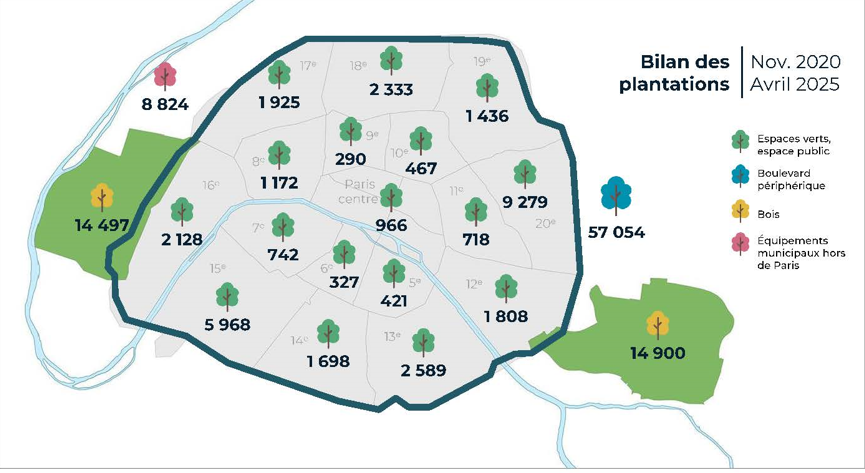
Conclusion of a study on how to live in a Paris at 50 degrees : plant trees.
See for instance: here (fr), and here (en)
Restore the database
we restore the plain SQL version of the backup
The plain SQL backup was created with
pg_dump --file "treesdb_v01.sql"
--host "localhost"
--port "5432"
--username "alexis" --no-password
--format=p --encoding "UTF8"
--section=pre-data --section=data --section=post-data
--no-owner --no-privileges
--create --clean --if-exists --verbose
--table "public.trees" "treesdb_v01"
The export includes the CREATE DATABASE statement. So you do not have to create the database before restoring the dump.
Explanation of the pg_dump statement
That command makes a plain-text SQL dump (because --format=p) of just the table public.trees from the database treesdb_v01.
Key points:
- Output goes to
treesdb_v01.sql. - It includes schema + data for the
treestable only. --create --clean --if-exists→ SQL will drop and recreate the DB/table.--no-owner --no-privileges→ skips ownership/GRANT statements.--verbose→ prints progress.
restore the database from the SQL file
To restore the database from that backup sql file:
- download the file from https://skatai.com/assets/db/treesdb_v01.sql
- open a PSQL window
- run the sql file with
\i /path/to/your/treesdb_v01.sql
or in the terminal with
psql -U username -d postgres -f /path/to/your/treesdb_v01.sql
on Windows : the unix style path will not work. use the windows style path instead: forward slashes
C:/path/to/your/treesdb_v01.sqlinstead of backslashesC:\path\to\your\treesdb_v01.sql.
To open a PSQL window in pgadmin
- launch pgadmin
- go to tools tab
- click on "PSQL Tool"
Binary backup
A binary dump is also available. It was created with the psql command pg_dump
pg_dump --file "treesdb_v01.dump" --host "localhost" --port "5432" --username "alexis" --no-password --format=c --large-objects --compress "9" --encoding "UTF8" --section=pre-data --section=data --section=post-data --no-owner --no-privileges --create --clean --if-exists --verbose "treesdb_v01"
Restoring the binary backup
Since the pg_dump command produced a custom-format binary dump (--format=c), we must use pg_restore.
I included --create and --clean, the dump already contains instructions to drop and recreate the database, so you typically restore into the Postgres cluster (not into an existing database).
Here’s the matching pg_restore command:
pg_restore --host "localhost" \
           --port "5432" \
           --username "alexis" \
           --no-password \
           --dbname "postgres" \
           --create \
           --clean \
           --if-exists \
           --verbose \
           "treesdb_v01.dump"
Explanation:
--dbname "postgres"→ Need to connect to an existing database (usuallypostgresortemplate1) because the dump will recreatetreesdb_v01.--create→ ensures the database defined in the dump is created.--clean --if-exists→ ensures objects are dropped before being recreated, matching the dump options.--verbose→ prints progress.
Note: in psql (terminal and pgadmin), you can check which folder you are in with the
\! pwdcommand. Change directory with\! cd /path/to/your/directory
check
Once the database loaded, check that things are correct with
connect to the database
\c treesdb_v01
list the tables
\dt treesdb_v01
inspect the trees table
\d trees
check how many rows you have (211339)
select count(*) from trees;
inspect a random sample
select * from trees order by random() limit 1;
The columns of the tree table
Here are the columns of the tree table
idbase: integerlocation_type: character varyingdomain: character varyingarrondissement: character varyingsuppl_address: character varyingnumber: character varyingaddress: character varyingid_location: character varyingname: character varyinggenre: character varyingspecies: character varyingvariety: character varyingcircumference: integerheight: integerstage: character varyinggeo_point_2d: character varyingremarkable: boolean
Goal
The trees dataset is not perfect. there are anomalies, missing data
The table data types is not optimal for some columns and we are missing a primary key
This dataset is a good example of real world datasets that are never perfect.
In this document we get a sense of the data, deal with some anomalies and transform the table with more appropriate data types.
We also leverage the postGIS / earthdistance extension for spatial data.
data analysis
Let's do some data analysis of the dataset.
select a random row from the trees db
     Column     |       value
----------------+-------------------
idbase         | 273252
location_type  | Arbre
domain         | Alignement
arrondissement | PARIS 18E ARRDT
suppl_address  |
number         |
address        | RUE DE LA CHAPELLE
id_location    | 000602007
name           | Tilleul
genre          | tilia
species        | cordata
variety        | Greenspire
circumference  | 34
height         | 5
stage          | Jeune (arbre)
geo_point_2d   | 48.89291084026716, 2.359807495821241
remarkable    | f
We see that we have:
- some categorical columns related to the location :
domain,arrondissement - categorical columns related to the nature of the tree :
name,genre,species,variety, - and also :
stage, - dimensions of the tree :
heightandcircumference(in meters) - columns related to the location of the tree:
address,suppl_address,number, ... - a
remarkableflag - and geo location : geo_point_2d with latitude and longitude of each tree
explore
Let's query the tree table and get a feeling for the values of the different columns
- how many trees per
domainorarrondissement - how many trees per
stage,genre,species... - how many trees are remarkable ?
- do all trees have a height and a circumference ?
- what's the average height for different
domain,stageorremarkable - what about the
location_typeandnumbercolumns ?
any other thing you can think of ?
PRIMARY KEY
Where's the primary key ?
The table loaded from a csv has no primary key although idbase seems like a good candidate. (after all it has id in it... must mean something right ?)
Could the idbase column be a primary key ?
What's a primary key and what is it used for ?
A primary key in SQL is a unique identifier for each record in a table.
A primary key is a constraint that enforces uniqueness and non-nullability for the column or columns it is applied to.
Having a primary key allows databases to index the table more efficiently, making searches and retrievals faster when accessing records by their primary key value.
foreign key
In relational databases, primary keys are often used as foreign keys in other tables. A foreign key is a column (or a combination of columns) that references a primary key in another table.
conditions for a primary key
A column is a good candidate as a primary key if:
- It contains unique values for each row.
- It does not contain any NULL values.
and
- It remains consistent and does not change often.
SERIAL
A primary key is usually also SERIAL.
In PostgreSQL, SERIAL is a special data type used for auto-incrementing integer columns, commonly employed for primary keys.
When you define a column with SERIAL, PostgreSQL automatically creates a sequence and sets it up so that each new row gets the next value from this sequence. (we'll come back to that in a moment)
back to serial
Based on this definition, the idbase column be a good candidate for primary key ?
Also, can it be serial ?
Let's check uniqueness of the values first :
Write a query to find out if some values of idbase have more than 2 rows
-- your query
This query shows that there are 2 rows with the same idbase
Maybe these are exact duplicates of trees? Let's check
You can select the trees that have duplicates idbase with
select * from trees where idbase in (
  select idbase from (
    SELECT idbase, COUNT(*)
    FROM trees
    GROUP BY idbase
    HAVING COUNT(*) > 1
  )
) order by idbase asc;
These trees have the exact same data except for some null values for heights and circumference which are different.
At this point there's no way to know which is the tree with the true values.
Note: although since duplicate trees have the same geolocation, they most probably are the same tree. we could just delete one of the record an dkeep the tree with the most complete data or highest height and circumference.
So to make idbase the primary we would have to delete the one of the duplicated trees.
- Check for null values : does the idbase have null values ?
- are the
idbasevalues sequential / continuous ? (check min and max and total count of trees)
Note a SERIAL primary does not have to be continuous. It can have gaps.
So we have 2 options
- either create a new primary key from scratch by adding a new column
idas SERIAL primary key - or transform the
idbaseas SERIAL primary key after deleting one of the duplicated tree.
The second option requires to delete some records and also to create a sequence.
So the 1st option (create new primary key) is the easiest one since the sequence is created automatically when adding a primary key.
The easiest solution is to create a new serial primary key
We can do that with
alter table trees add COLUMN id SERIAL PRIMARY KEY;
As expected, creating a primary key also creates a sequence ;
treesdb=# \d


 Schema |     Name     |   Type   | Owner
--------+--------------+----------+--------
 public | trees        | table    | alexis
 public | trees_id_seq | sequence | alexis
Sequence
Postgres Sequence
a sequence is a special database object designed to generate a sequence of unique, incremental numbers. It is commonly used to create auto-incrementing values, typically for columns like primary keys.
- Unique: Each number in the sequence is guaranteed to be unique.
- Incremental: The sequence can increment (or decrement) by a specified value.
- Independent Object: A sequence is a separate object in the database and is not directly tied to any table or column, though it is often associated with a column (like SERIAL or BIGSERIAL columns).
- NEXTVAL Function: To get the next value in the sequence, you call nextval('sequence_name'), which increments the sequence and returns the next number.
- START, INCREMENT, and MAXVALUE: You can specify the starting value, how much to increment by, and an optional maximum value for the sequence.
\d+ trees_id_seq

  Type   | Start | Minimum |  Maximum   | Increment | Cycles? | Cache
---------+-------+---------+------------+-----------+---------+-------
 integer |     1 |       1 | 2147483647 |         1 | no      |     1
Owned by: public.trees.id
and
\d+ trees

    Column     |       Type        | Collation | Nullable |              Default
----------------+-------------------+-----------+----------+-----------------------------------
 id             | integer           |           | not null | nextval('trees_id_seq'::regclass)
notice the nextval('trees_id_seq'::regclass) which increments the counter in the sequence each time it is called
also notice the new index
Indexes:
    "trees_pkey" PRIMARY KEY, btree (id)
We shall keep the idbase column for future references but we will use id as the primary key.
data types
Improving the column types
At this point, all columns are varchar (synonym for text in postgresSQL) except for the height and circumference (integers)
That does not make sense for columns such as: remarkable, or geo_point_2d (latitude and longitude)
remarkable should be a boolean
What are the values taken by remarkable ?
How to transform the column which has NON, OUI, or '' (empty string) as values insetad of regular boolean values t, f and null
Your task:
- create a new column
remarkable_bool - get the proper values in the new column from the old column
Use UPDATE and CASE to copy / convert the values
update trees
SET remarkable_bool =
    CASE remarkable
        WHEN 'OUI' THEN TRUE
        WHEN 'NON' THEN FALSE
        ELSE NULL  -- handles empty string and any other values
    END;
- check that the conversion worked
- drop the old column
- rename the new column into the old column name
Geo location
geo_point_2d is a string
geo_point_2d holds the latitude and longitude of the trees. We could transform geo_point_2d as an array of floats. However there are specific data types for geo localization.
Using the proper data type will allow us to more easily carry out calculations specific to locations. For instance find the nearest trees, or calculate the distance between trees.
We have a choice to use a native POINT data type which is available by default in PostgreSQL or a PostGIS geography data type (needs the PostGIS extension).
Comparison between POINT and GEOGRAPHY
| Feature | POINT | GEOGRAPHY |
|---|---|---|
| Coordinate System | Flat, Cartesian (x, y) | Spherical (longitude, latitude) |
| Earth's Curvature | Not accounted for | Accounted for |
| Distance Calculations | Euclidean (straight line on flat plane) | Great circle (curved line on Earth's surface) |
| Accuracy over Large Distances | Less accurate | Maintains global accuracy |
| Performance | Generally faster for basic operations | May be slower but more accurate for geographic calculations |
| Use Cases | Local, small-scale applications (e.g., floor plans, 2D games) | Global, large-scale geographic applications (e.g., GPS, GIS) |
| Additional Functionality | Limited to basic geometric operations | Extensive GIS functions available through PostGIS |
| Data Representation | Simple (x, y) coordinates | Complex spheroidal calculations |
| Spatial Reference System | Typically assumes a flat plane | Supports various geographic coordinate systems (e.g., WGS84) |
| Storage Size | Smaller | Larger due to additional metadata |
PostGIS vs Earth distance
Installing the PostGIS extension is a bit complex. We will use the native POINT data type for now and the earthdistance extension.
see this article for a good comparison: https://hashrocket.com/blog/posts/juxtaposing-earthdistance-and-postgis
How to use earthdistance
Install earthdistance extension
in PSQL
CREATE EXTENSION cube;
CREATE EXTENSION earthdistance;
check that both extensions are installed with
select * from pg_extension;
or
\dx
in pgadmin, expand the databse name and click right on the expansion menu
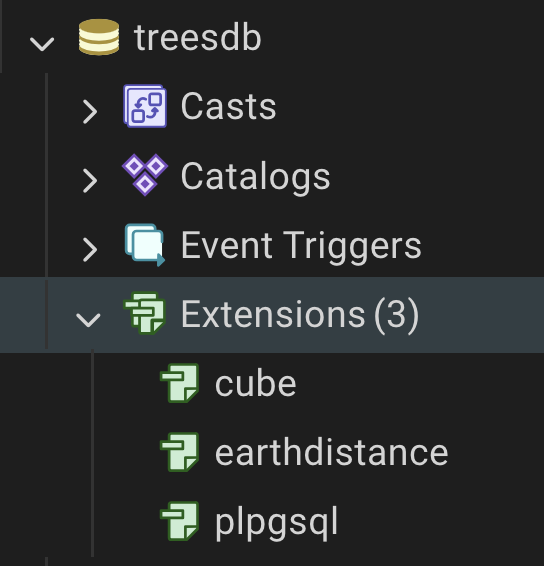
Calculate distances between 2 points
Then you can select distances between 2 points
SELECT earth_distance(
  ll_to_earth(48.8566, 2.3522),   -- Paris
  ll_to_earth(51.5074, -0.1278)   -- London
) AS distance_meters;
This gives the distance in meters.
using POINT in earthdistance
⚡ If you currently store locations as POINT
If you have a column like:
location POINT
You can still use it, just extract its coordinates:
SELECT earth_distance(
  ll_to_earth( location[1], location[0] ),  -- POINT(x,y) = (lon,lat)
)
FROM places;
⚠️ Important: POINT(x, y) is usually (x=longitude, y=latitude), so make sure you pass them as (lat, lon) to ll_to_earth.
Transform the geo_point_2d from varchar to POINT
- Add a column
geolocationwith type POINT.
ALTER TABLE trees ADD COLUMN IF NOT EXISTS geolocation point;
- Update the new column with POINT values :
- extract longitude string value from geo_point_2d, and cast as float,
- use the function
ST_MakePoint(lon as float, lat as float)to create a point from the longitude and latitude. - remember to swap latitude and longitude
- delete the original
geo_point_2dcolumn
We use the following functions SPLIT_PART, TRIM and CAST to extract the latitude and longitude from the string.
See postgres documentation strings functions
Your query should look like that
UPDATE trees
SET geolocation = point(
    CAST(TRIM(SPLIT_PART(geo_point_2d, ',', 2)) AS double precision), -- x = longitude
    CAST(TRIM(SPLIT_PART(geo_point_2d, ',', 1)) AS double precision)  -- y = latitude
)
-- here check that geo_point_2d is not null and not empty and has a comma
WHERE geo_point_2d IS NOT NULL
  AND TRIM(geo_point_2d) <> ''
  AND POSITION(',' IN geo_point_2d) > 0;
finally delete the geo_point_2d column
ALTER TABLE trees DROP COLUMN IF EXISTS geo_point_2d;
Closest tree
Given a tree index (id = 1234), find the N closest trees
WITH anchor AS (
  SELECT x(geolocation) AS lon, y(geolocation) AS lat
  FROM trees
  WHERE id = 1234
)
SELECT t.id,
       earth_distance(
         ll_to_earth(a.lat, a.lon),
         ll_to_earth(y(t.geolocation), x(t.geolocation))
       ) AS meters
FROM anchor a
JOIN trees t ON t.id <> 1234
ORDER BY meters
LIMIT 10;  -- put N here
What the WITH (CTE) does
anchor runs once to fetch the reference tree’s coordinates.
It exposes them as a.lon and a.lat for the main query, avoiding repeated subqueries.
Why y(t.geolocation)?
In Postgres, the point type is (x, y) = (longitude, latitude).
The helper functions:
x(point) → returns x = longitude.y(point) → returns y = latitude.ll_to_earth(lat, lon)expects (latitude, longitude) in that order.
So for each row t, we pass y(t.geolocation) (lat) first, then x(t.geolocation) (lon).
We can then adapt the query to find the trees near a given location if we know its coordinates
Trees with crazy measurements
Anomalies in the data
Some common queries
To finish our work on the trees table, we'd like to flag trees that have anomalies in terms of height and circumference.
Let's look at some stats first to undertsand what normal data looks like
To detect anomalies for a given column, you can get a good insight about a variable distribution by writing a query to find : min, max, average, median, 95 and 5 percentiles for a given float column.
This mimics the df.describe() in pandas data frames.
You can use the function PERCENTILE_CONT(p) with p as the percentile value (0.5 for median, 0.9, 0.95 0.99 etc ...)
Note: you need to sort the values before applying
PERCENTILE_CONTand calculating the percentile.
The right way to calculate a percentile in sql is
PERCENTILE_CONT(0.5)           -- What: Find the 50th percentile
WITHIN GROUP                    -- Where: Within the current group of rows
(ORDER BY height)              -- How: Order by height to determine position
- calculate the percentiles for height and circumference as well as min, max and average values.
- give a proper name to your resulting columns.
- what stands out ?
SELECT
  MIN(height)        AS min_height,
  MAX(height)        AS max_height,
  AVG(height)        AS avg_height,
  PERCENTILE_CONT(0.5) WITHIN GROUP (ORDER BY height) AS median_height,
  PERCENTILE_CONT(0.05) WITHIN GROUP (ORDER BY height) AS p05_height,
  PERCENTILE_CONT(0.95) WITHIN GROUP (ORDER BY height) AS p95_height,
  PERCENTILE_CONT(0.99) WITHIN GROUP (ORDER BY height) AS p99_height

FROM trees;
- how many trees have 0 for height ?
- how many trees have height greater than the 99th percentile ?
SELECT COUNT(*) AS trees_above_p99
FROM trees
WHERE height > (
  SELECT PERCENTILE_CONT(0.99) WITHIN GROUP (ORDER BY height)
  FROM trees
);
notice the embedded select clauses
Check which trees (id) have height greater than the 99th percentile, order by height desc, limit to 10;
SELECT id, height
FROM trees
WHERE height > (
  SELECT PERCENTILE_CONT(0.99) WITHIN GROUP (ORDER BY height)
  FROM trees
)
ORDER BY height DESC
LIMIT 10;
Flag the trees with outlier height
So let's create a BOOLEAN column called outlier that indicates that there's an anomaly with a tree record.
ALTER TABLE trees ADD COLUMN outlier boolean;
the circumference is in centimeters while the height is in meters and in the original dataset, both are recorded as ints (no decimal points are available)
Use the 99 percentile as a threshold for anomalous values.
UPDATE trees
SET outlier = height > (
  SELECT PERCENTILE_CONT(0.99) WITHIN GROUP (ORDER BY height)
  FROM trees
);
Now let's check for circumference anomalies
but first let's convert the circumference to diameter (diameter = circumference / pi).
-- add a new column diameter as float
and update the diameter column with circumference/pi
-- your query
Now find trees that have a insanely high diameter (calculate the 99 percentile of the diameter)
Uupdate the anomaly column with these trees
And finally also set the anomaly column to true for duplicates of idbase
other anomalies ?
Are there other anomalies such as duplicates addresses ?
Although zero values for height and circumference could simply indicate a young small tree whose measures have been rounded down a bit harshly.
It may be difficult to decide if the height or diameter of a tree is an anomaly or not.
for instance the tree 187635 has a height of 98m.
| column | value |
|---|---|
| idbase | 2018097 |
| location_type | Arbre |
| domain | Alignement |
| arrondissement | PARIS 18E ARRDT |
| suppl_address | 108V |
| number | |
| address | RUE DE LA CHAPELLE |
| id_location | 2002004 |
| name | Platane |
| genre | Platanus |
| species | x hispanica |
| variety | |
| circumference | 68 |
| height | 98 |
| stage | Jeune (arbre) |
| geo_point_2d | 48.89815810816667, 2.3591531336170086 |
| id | 187635 |
| remarkable | f |
| diameter | 21.645072260497766 |
| geolocation | (2.3591531336170086,48.89815810816667) |
that's a lot but is it a valid height for a tree? Are they trees that tall in Paris ?
We can investigate in 2 ways
input the coordinates in google maps and look at the photo of the street
or check the height of nearby trees with the closest trees query
WITH given_tree AS (
  SELECT id, geolocation
  FROM trees
  WHERE id = 187635
)
SELECT
  t.id,
  t.height,
  t.geolocation,
  ROUND(
    SQRT(
      POW((t.geolocation[0] - gt.geolocation[0]) * 73000, 2) +
      POW((t.geolocation[1] - gt.geolocation[1]) * 111000, 2)
    )
  ) AS distance_meters
FROM trees t, given_tree gt

ORDER BY t.geolocation <-> gt.geolocation
LIMIT 9;
All surrounding trees have a height of 5 to 16 meters. So 98 meters is not a valid measurement.
Finally let's dump the database
using pgAdmin export the database as plain format with name treesdb_v03.sql
Recap
The table loaded from the csv / sql dump was lacking a primary key, proper datatypes and had many data anomalies
- We checked that the
idbasecolumn was not a good choice as a primary key - Transformed remarkable as a boolean data type,
- installed and activated the postgis extension (when possible)
- which allowed us to transform the geo_point_2d into a postGIS GEOGRAPHY data type and find closest trees given a location
- we also looked at the native POINT data type
- We identified the extreme or missing values of height, circumference and diameter of some trees and flagged these trees.
The current table is much more clean and in a state more compatible with production.
Next we move away from the single table database and start building a proper relational database from that dataset.