Intermediate databases - Epita 2025

Who am I?
Alexis Perrier
- PhD TelecomParis 95'
- Developper, Teacher, Author, Data scientist
- cycling, staying fit, scifi, nerd



The Course
15 sessions - 2h
- hands-on activities
- real datasets
- readings
- exit tickets
- postgreSQL
- evaluation
- multiple workshops
Course content
What is this course about?
- Relational databases
- PostgresQL
- SQL
What you will be able to do:
- design efficient and scalable databases
- write lightning fast SQL queries
- setup, secure, administer, optimize a database
=> which in turn should bring good health, fortune and happiness
Curriculum / Scope
Advanced Database Design: understanding of normalization and denormalization concepts to optimize database structure
- SQL Query Optimization: write high-performance SQL queries,
- execution plan analysis,
- index usage,
- optimization of joins and subqueries.
- Index Creation and Management: Understand the importance of indexes in improving database performance
- learn to create and manage different types of indexes (B-tree, hash, etc.).
-
Views and Stored Functions:
- create views to simplify complex queries
- use stored functions to encapsulate business logic within the database - PLSQL
-
Transactions and Concurrency Control:
- ensure data integrity in multi-user environments.
-
Database Security: Introduce database security concepts,
- access control,
- roles and permissions,
- best practices for protecting sensitive data.
-
Maintenance and Monitoring:
- Implement preventive maintenance techniques and monitoring to ensure database availability and performance.
-
Triggers and procedures
-
CTEs, Window functions
Ifs
datasets
Real datasets!
- Trees of Paris from Paris open data
- Ademe: building energy efficiency
- Airdb : flights, passengers, airports
- Classic kaggle datasets

Questions ?
Getting to know you
Just a few questions to know more about you
 [forms.gle/VrpvjaPGEKCUji4Q9](https://forms.gle/VrpvjaPGEKCUji4Q9)
Today
Goals
- context : understand why relational database and why postgresQL
- install postgres on local
- use psql
- create a database and load open data : trees of Paris
- have a working pgadmin console
- review common SQL queries
resources
Postgres tutorials
The best resource is the excellent documentation
Why SQL ? Why PostgresQL ?
Why a database ?
organize complex structured data
SQL is everywhere
- phones : with sqlite
- small to huge online services: mywebshop to Insta, Linkedin ...
- behind all major software platforms (think Industrial applications)
- all financial transactions ...
database vs excel file ?
Discussion : Why use a database instead of just … files like json, or excel / csv ?
What is a database?
Sometimes we hear the word database used to describe an Excel file.
A definition
So I asked my friend GPT-4 to give me a definition of a database:
In simple terms: "A database is like a smart notebook or filing system that helps you keep track of lots of information and find exactly what you need in no time."
which definitely includes CSV files, Excel files, JSON files, XML files, and many other simple file-based formats.
Another definition
From the Encyclopedia Britannica, we get:
database, any collection of data or information specifically organized for rapid search by computer. Databases are structured to facilitate storage, retrieval, modification, and deletion of data.
See also the Database article on Wikipedia.
a database is an organized collection of data or a type of data store based on the use of a database management system (DBMS), the software that interacts with end users, applications, and the database itself to capture and analyze the data.
Not only about finding data
No longer just talking about quickly finding information (the search part) but also about:
- storage
- modification
- deletion
- Administration.
This is where a simple spreadsheet file no longer meets the objective.
What we expect from a DBMS
A database management system (DBMS) is distinguished from a simple spreadsheet by several essential functionalities.
| Feature | Description | Excel | DBMS |
|---|---|---|---|
| Data Storage and Retrieval | Stores data in an organized manner and retrieves it as needed. | ✅ | ✅ |
| Data Manipulation | Allows adding, modifying, or deleting data. | ✅ | ✅ |
| Data Querying | Allows asking complex questions (queries) about the data. | ✔️ | ✅ |
| Data Organization | Structures data in formats such as tables, documents, or graphs to facilitate management. | ✅ | ✅ |
| Data Sharing | Allows multiple users or applications to use the database simultaneously. | ✅ | ✅ |
| Data Security | Protects data against unauthorized access or corruption. | ✔️ | ✅ |
| Concurrency Control | Manages multiple users modifying data at the same time without conflicts. | ✅ | |
| Backup and Recovery | Ensures that data is not lost and can be restored in case of failure. | ✔️ | ✅ |
| Data Integrity | Ensures that data remains accurate, consistent, and reliable. | ✅ | |
| Performance Optimization | Provides tools to optimize the speed and efficiency of data retrievals and updates. | ✅ | |
| Support for Transactions | Ensures that a group of operations (transactions) is completed entirely or not at all. ACID compliance | ✅ |
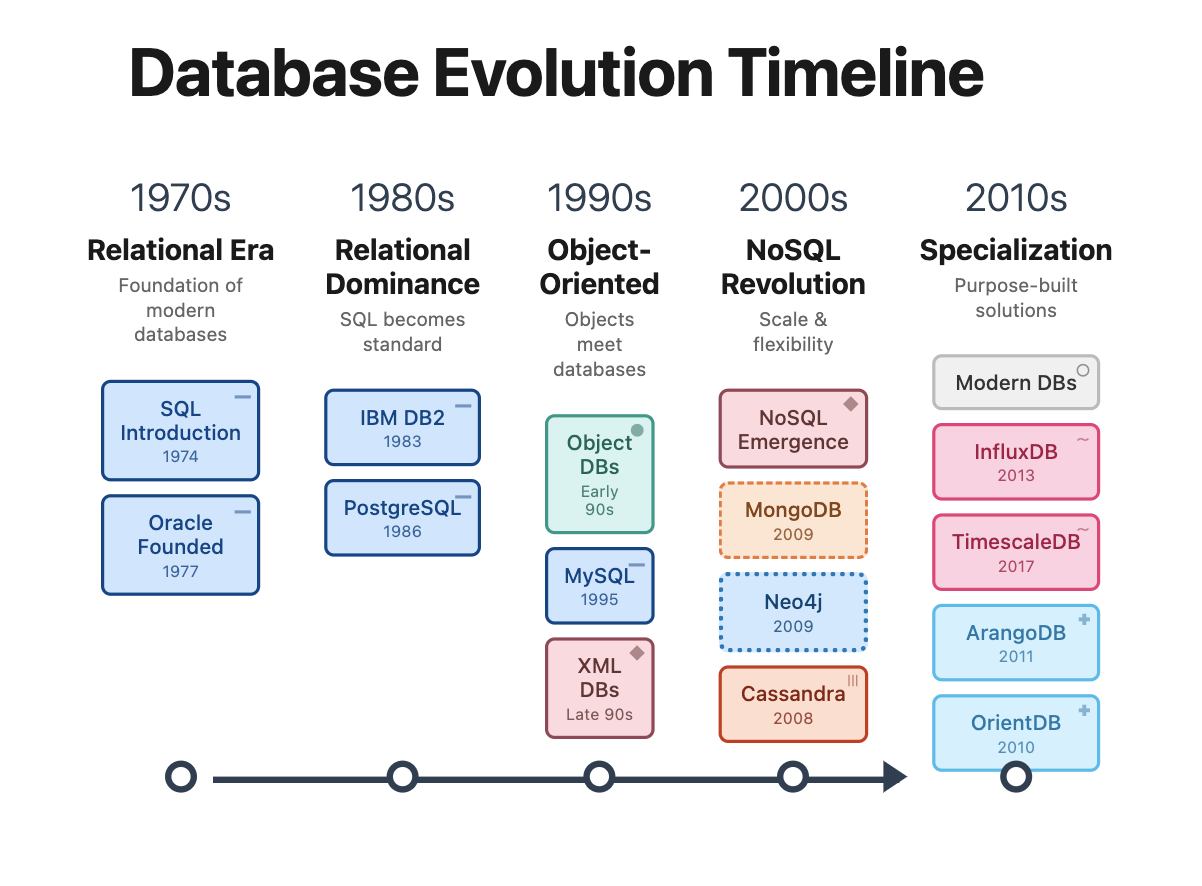
A Brief History of Databases
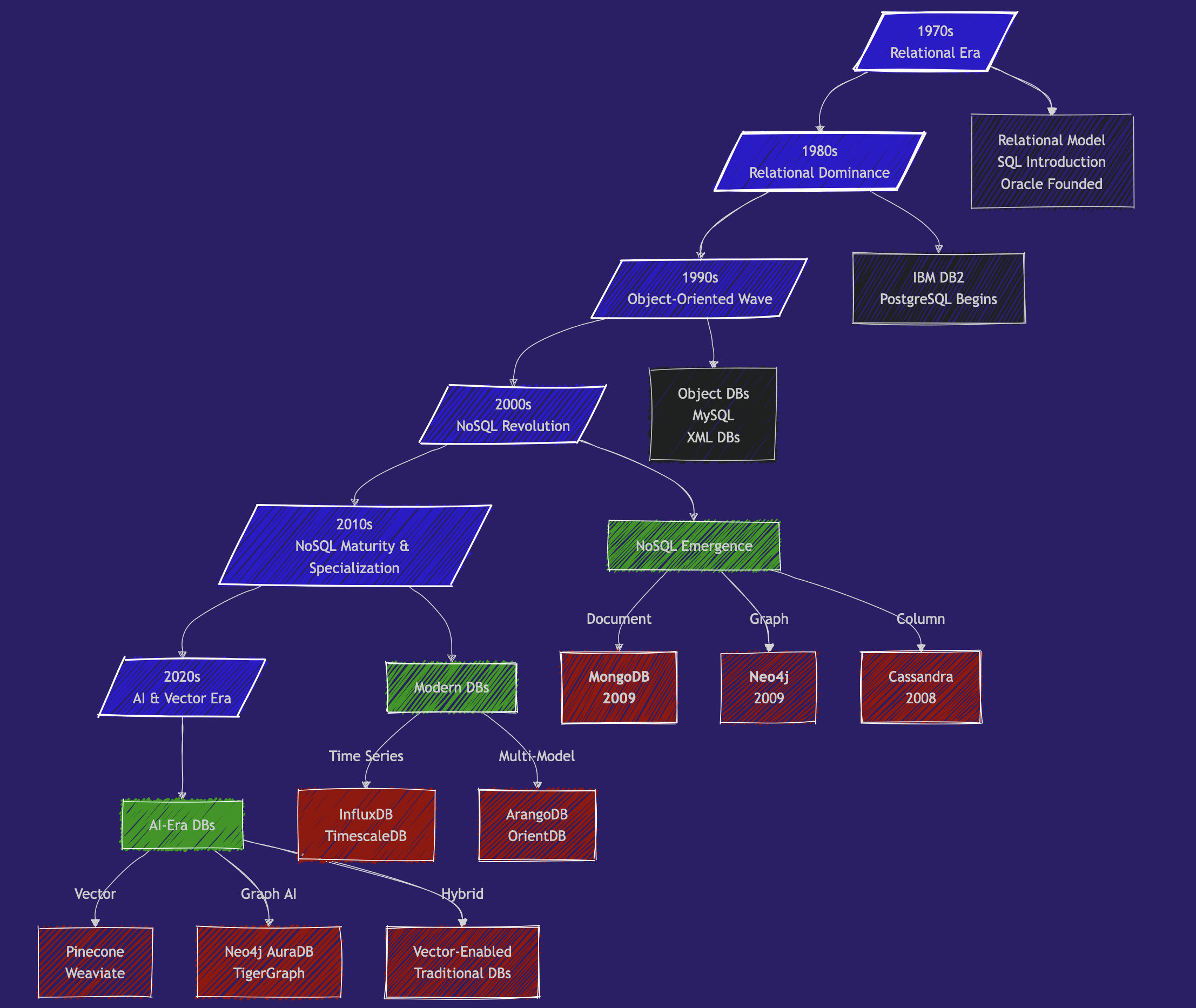
1970s - The Beginning of the Relational Era
- 1970: Edgar Codd publishes "A Relational Model of Data for Large Shared Data Banks"
- 1974: IBM develops System R, the first SQL DBMS prototype
- 1979: Oracle launches the first commercial SQL implementation
1980s - The Domination of Relational
- 1989: Beginning of POSTGRES development (now PostgreSQL) at UC Berkeley
- 🎖️🎖️🎖️ the reference SQL database.
- now can handle no-sql & vector,
- numerous extensions (http, postgis, ...).
- exceptional performance.
- and OPEN SOURCE: free, efficient, and secure.

1990s - The Object-Oriented Wave
-
1991: Object-Oriented databases gain attention.
Most OODBs from the 90s are no longer used. But they influenced the evolution of both SQL and NoSQL databases. -
1995: MySQL is released as open source
2000s - The Beginning of the NoSQL Revolution
- 2 important papers that laid the foundations for NoSQL systems: BigTable paper (Google, 2004) and Dynamo paper (Amazon, 2007)
And in 2009, 2 new NoSQL databases are launched:
- 🥭🥭🥭 MongoDB
- 🎉🎉🎉 Neo4j
Mongodb is web scale
That was 15 years ago back in Aug 27, 2010.
Why at this moment?
The rise of the world wide web (myspace - 2003 😍, youtube - 2005) and the massive increase in application scale by several orders of magnitude.
Suddenly, we have millions of people simultaneously trying to access and modify Terabytes of data in milliseconds.
Relational databases cannot keep up with the scale of applications, the chaotic nature of unstructured data, and the speed requirements.
The promise of NoSQL is volume and speed.
2010s
NoSQL Matures & Specialization - Big Data and Specialized Databases
- Big Data Databases: Systems like Apache Hadoop (2006) and Apache Spark (2009) enabled very large-scale data processing.
- Graph Databases gain popularity with use cases like fraud detection, knowledge graphs, and supply chain management. Neo4j and Amazon Neptune become key players.
- Time-Series Databases (e.g., InfluxDB, TimescaleDB): designed for monitoring systems: IoT, logs, ...
- Cloud Databases: managed services like Amazon RDS, Google BigQuery, or Snowflake
and meanwhile, in 2013, Docker containers revolutionize database deployment
2020s: AI, Vector Databases, and Real-Time Needs
-
Vector Databases 🌶️🌶️🌶️ (e.g., Pinecone, Weaviate, Qdrant, Milvus, Faiss, ...):
- Handle high-dimensional vector embeddings used in AI/ML applications
-
and also:
- Graph + AI: knowledge graphs and LLMs.
- Multi-Model Databases that support multiple data models (document, graph, key-value) in a single system.
- Real-Time Analytics: optimized for real-time data streaming and analytics.
- Serverless Databases
Current Trends (2025)
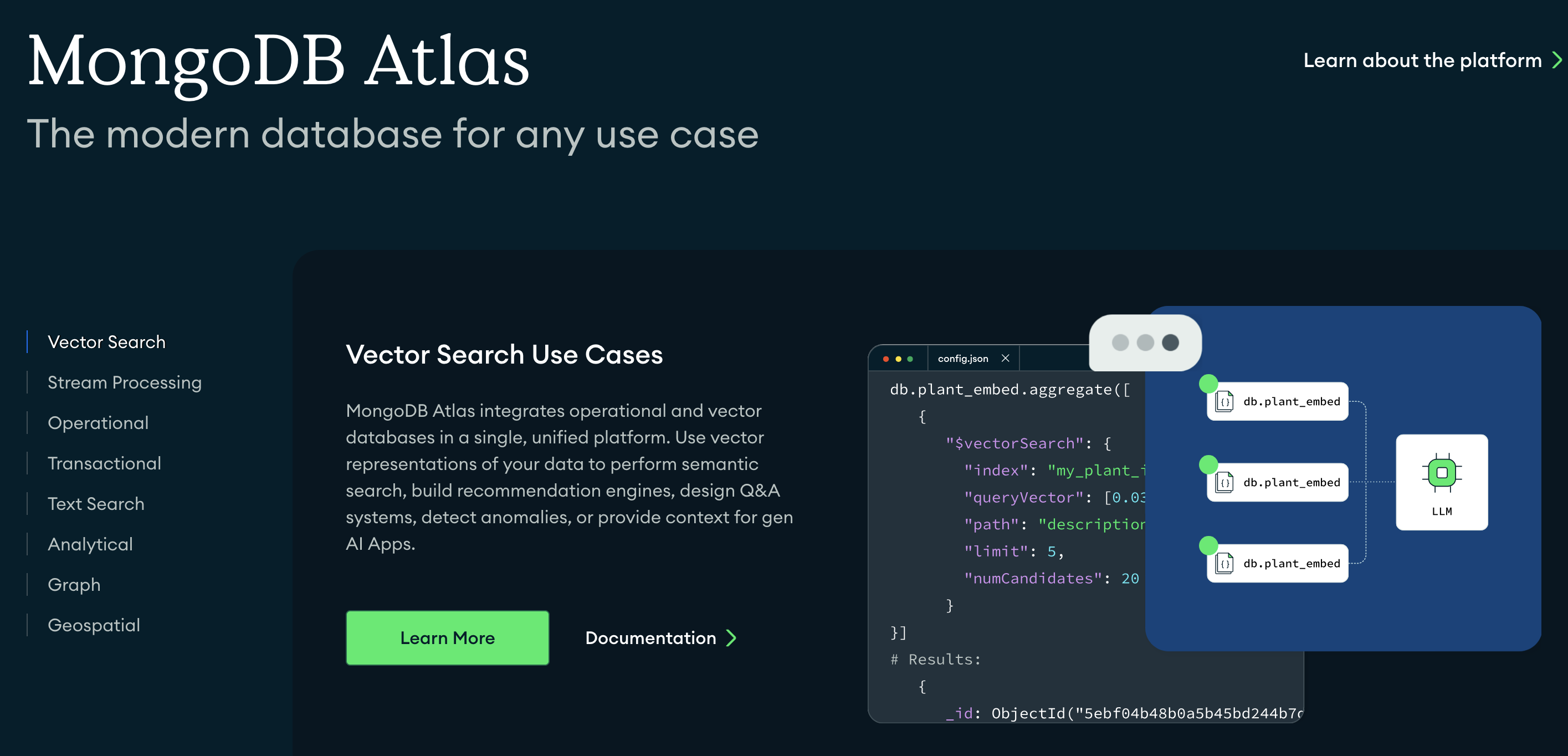
Vector search is booming. Vector search capabilities are being integrated into most existing DBMS, including PostgreSQL, MongoDB, and Neo4j.
In Brief
- 1989: Launch of PostgreSQL
- 2009: Launch of MongoDB and Neo4j
- 2024: vector databases are in vogue while older databases integrate vector search
Types of relational databases
-
Relational databases
- Relational (RDBMS) – Classic SQL structure (e.g. MySQL, PostgreSQL, Oracle)
- Embedded – Runs inside apps (e.g. SQLite, H2)
- Distributed – Scales across machines (e.g. CockroachDB, YugabyteDB)
- Cloud-native – Built for cloud infra (e.g. Amazon Aurora, Google Spanner)
- In-memory – Super fast, uses RAM (e.g. SAP HANA, MemSQL)
- Columnar – Optimized for analytics (e.g. ClickHouse, Amazon Redshift)
Other Types of databases
There are other types of databases than relational databases :
-
Vector database for LLMs
- text is transformed as a vector
- db is optimized to retrieve similar vectors
-
Document – JSON-like docs (e.g. MongoDB, Couchbase)
-
Key-Value – Fast lookup via key (e.g. Redis, DynamoDB)
-
Wide-Column – Columns grouped in families (e.g. Cassandra, HBase)
-
Graph – Nodes + edges (e.g. Neo4j, ArangoDB)
-
Time-Series – Optimized for time data (e.g. InfluxDB, TimescaleDB)
-
Multi-model – Mix of types (e.g. ArangoDB, OrientDB)
-
Vector: for LLMs, text transformed as a vector, optimized to retrieve similar vectors (Weaviate, Pinecone, Milvus, ..)
Main Categories of Databases Today
We have many databases to choose from. It all depends on scale, application nature, budget, etc.
| Database Type | Purpose | Examples | Application |
|---|---|---|---|
| Relational - SQL | Fixed schema | PostgreSQL, MySQL, Oracle | Transactions, normalization |
| Document Stores | Flexible schema, JSON-like documents | MongoDB, CouchDB | Web applications, content management |
| Graph Databases | Relationship-centered data | Neo4j, ArangoDB | Social networks, recommendation engines |
| Key-Value Stores | Simple and fast lookups | Redis, DynamoDB | Caching, session management |
| Vector Databases | Similarity search, AI embeddings | Pinecone, Weaviate | AI applications, semantic search |
| Column-Family Stores | Wide-column data, high scalability | Cassandra, HBase | Time-series, big data applications |
| Time-Series Databases | Time-ordered data | InfluxDB, TimescaleDB | IoT, monitoring systems |
Fuzzy separation
- Many databases now include vector types, and search
- postgres can do vector search, document based (json) etc
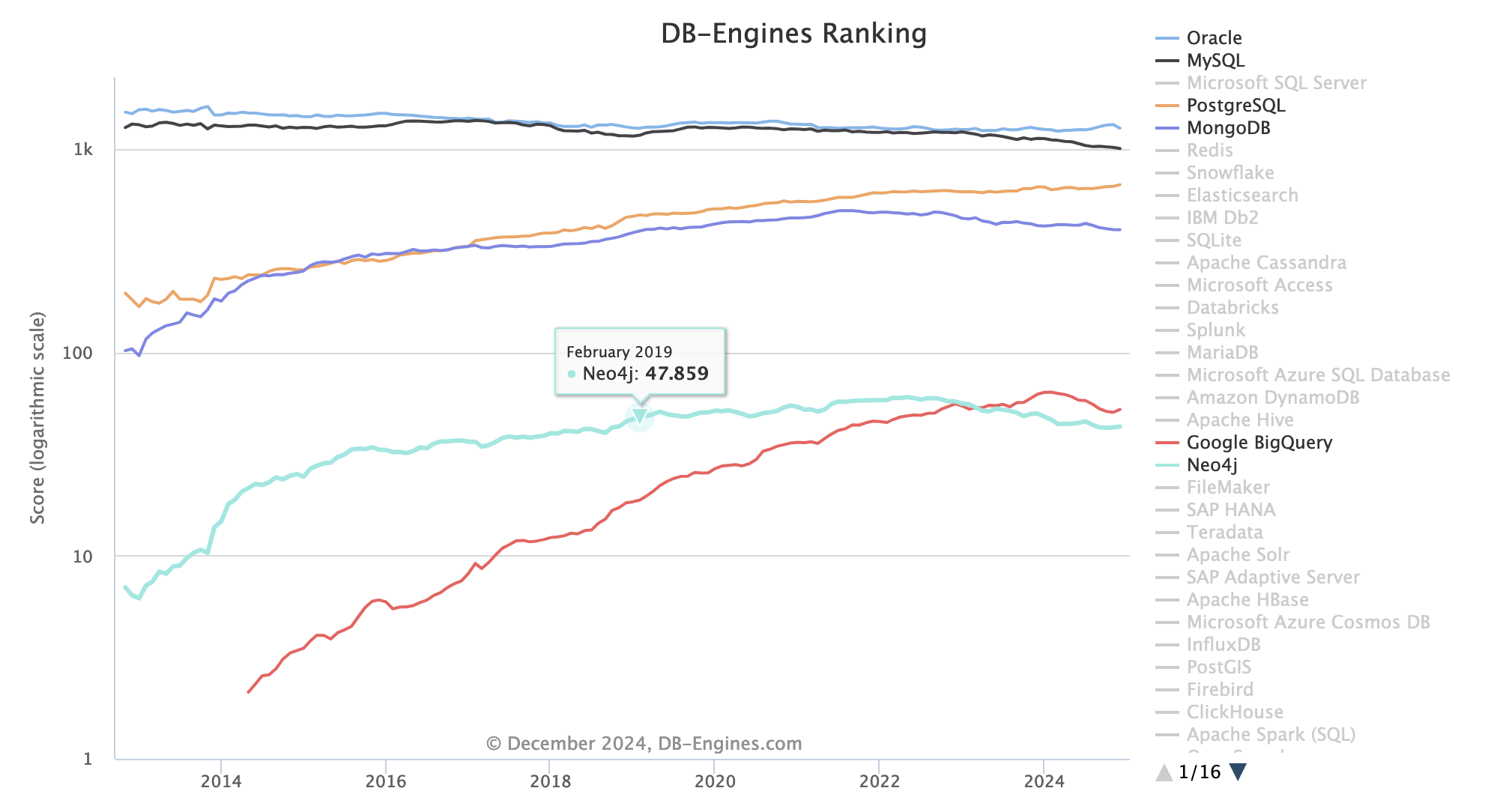
Ecosystem
Check the ranking of all databases at https://db-engines.com/en/ranking
Trends: https://db-engines.com/en/ranking_trend
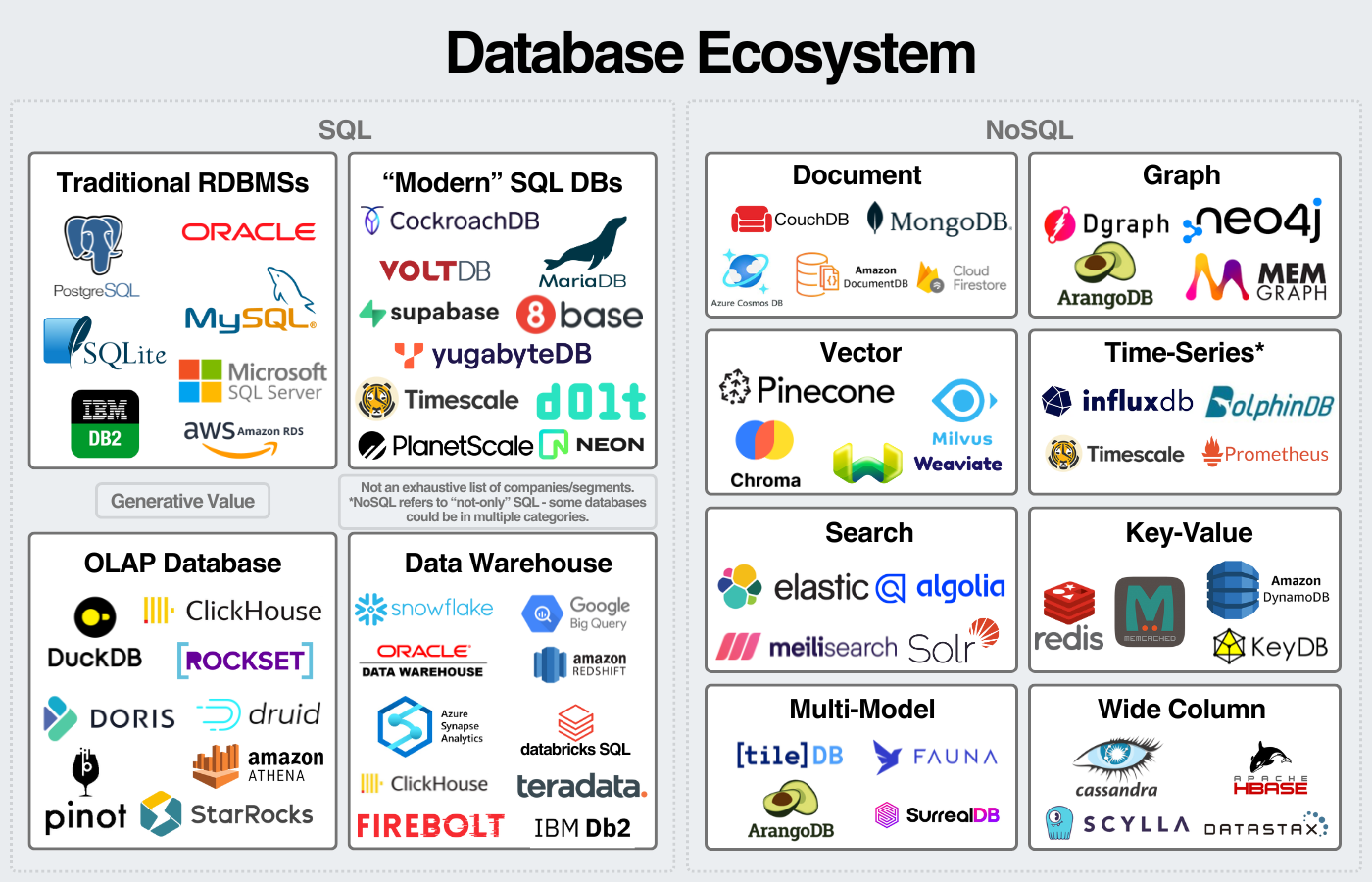
Multitude of players:
source: https://www.generativevalue.com/p/a-primer-on-databases
Also see this interactive map that lists all players in 2023.
Open source vs closed
Open-Source Databases
Advantages
✅ Free to use
✅ Transparent (view + audit code)
✅ Customizable
✅ Strong community support
✅ No vendor lock-in
Disadvantages
❌ May need more setup & tuning
❌ Support = community or paid 3rd party
❌ Fewer enterprise features (sometimes)
Proprietary Databases
Advantages
✅ Enterprise-grade support
✅ Robust tooling & integrations
✅ Optimized performance at scale
✅ Security/compliance features
Disadvantages
❌ Expensive licensing
❌ Closed codebase
❌ Vendor lock-in risk
❌ Limited customization
Postgres
Postgres rules!
In terms of relational databases compare
- postgreSQL
- mysql / MariaDB : MariaDB is a truly open source distribution of MySQL (released under the GNU GPLv2). It was created after Oracle's acquisition of MySQL,
- SQLite
https://opensource.com/article/19/1/open-source-databases
Postgres advantages
PostgreSQL's most mentioned advantage is the efficiency of its central algorithm, which means it outperforms many databases that are advertised as more advanced.
One of the most flexible open source databases around;
You can write functions in a wide range of server-side languages: Python, Perl, Java, Ruby, C, and R.
SQLITE
SQLite is arguably the most implemented database engine in the world,
unlike many other databases it is not a client-server engine; rather, the full software is embedded into each implementation
to build and implement a small database, SQLite is arguably the best way to go. It is extremely small,
also very Fast
PostgresQL Extensions
Extensions : add-ons that enhance the functionality of a PostgreSQL database.
- provide new types of indexes, data types, procedural languages, or additional functions, thereby extending the core capabilities of PostgreSQL. Examples include
- PostGIS for geographic data,
- pg_trgm for text search,
- hstore for key-value storage.
Case study
The Guardian: from MongoDB to postgresQL
Take a few minutes to read the article
https://www.theguardian.com/info/2018/nov/30/bye-bye-mongo-hello-postgres
from 2018, so no hasty conclusion. the article underlines the difficulty of choosing the right database. MongoDB has evolved a lot since then.
Takeaways
Reasons for Moving from MongoDB to Migration Process: PostgreSQL:
-
Operational Challenges: The Guardian faced significant issues with MongoDB's OpsManager, including time-consuming upgrades, lack of effective support during outages, and the need for extensive custom scripting and management.
-
Cost and Efficiency: The high cost of MongoDB's support contract combined with the ongoing operational burden led them to seek a more manageable and cost-effective solution.
-
Feature Limitations: Alternatives like DynamoDB were considered but lacked essential features like encryption at rest, which Postgres on AWS RDS provided.
-
Parallel APIs: They created a new API using PostgreSQL and ran it in parallel with the old MongoDB API to ensure a smooth transition.
-
Data Migration: Content was migrated using a script that compared and validated data between the two databases.
-
Proxy Usage: A proxy was employed to replicate traffic to both databases, ensuring consistency and allowing for real-time testing.
-
Gradual Switchover: The team gradually shifted traffic to the new Postgres API, eventually decommissioning MongoDB without causing downtime.