Views in PostgreSQL
A view in PostgreSQL is a virtual table that is created by a SELECT query.
It abstracts or simplifies complex queries.
It acts as a stored query that you can treat like a regular table.
Quick example
Let's consider the normalized version of the trees table.
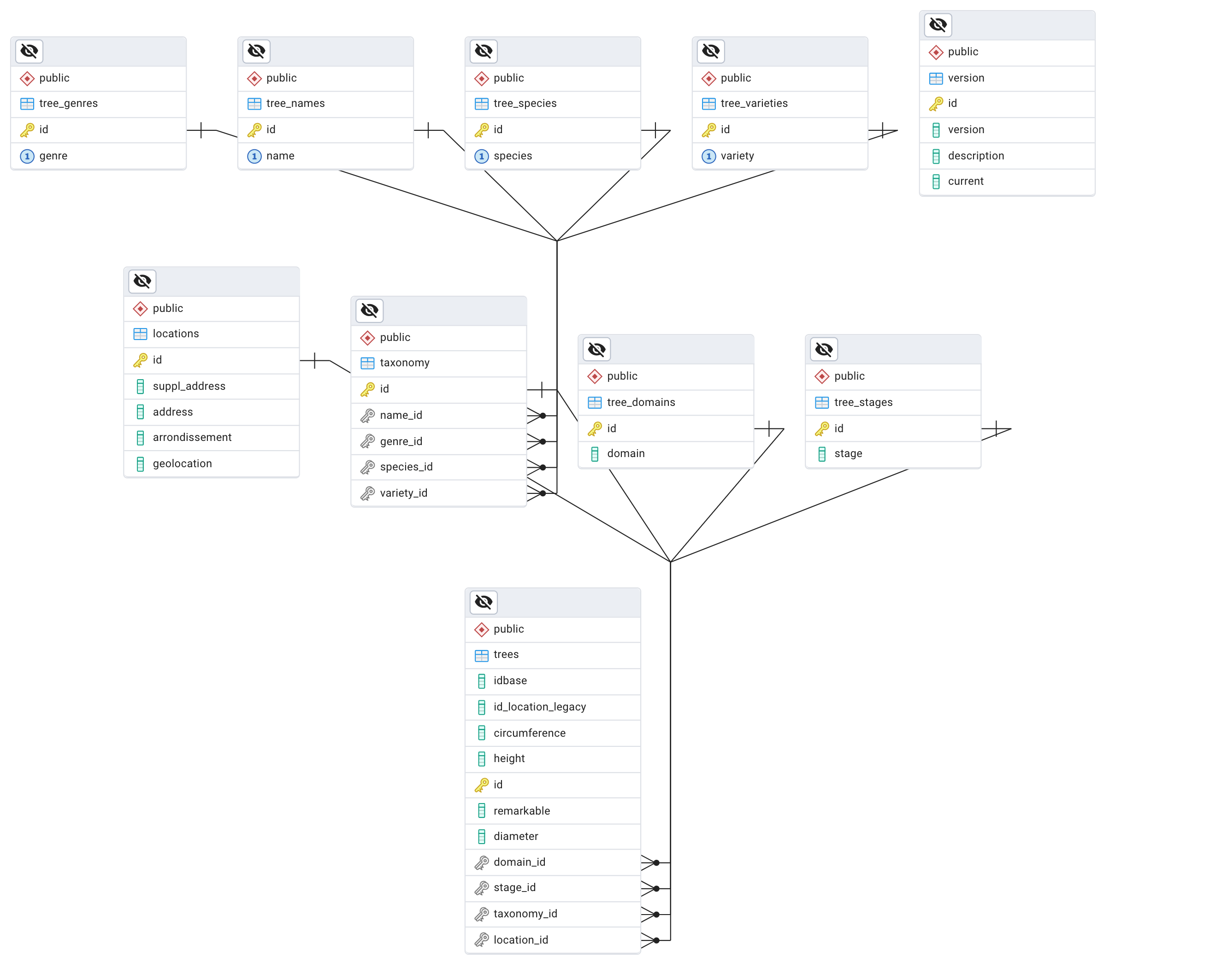
To see all the trees given a certain name, genre, species or variety you have to write a query with several joins
SELECT t.idbase, t.circumference, t.height, t.diameter, t.remarkable,
       tn.name, tg.genre, ts.species, tv.variety
FROM trees t
JOIN taxonomy tax ON t.taxonomy_id = tax.id
JOIN tree_names tn ON tax.name_id = tn.id
JOIN tree_genres tg ON tax.genre_id = tg.id
JOIN tree_species ts ON tax.species_id = ts.id
JOIN tree_varieties tv ON tax.variety_id = tv.id
WHERE tv.variety = 'October Glory';
If you have to write this query a lot, it makes sense to create a view with
CREATE VIEW taxonomy_view AS
SELECT
    t.idbase,
    t.id_location_legacy,
    t.circumference,
    t.height,
    t.diameter,
    t.remarkable,
    t.domain_id,
    t.stage_id,
    t.location_id,
    tn.name AS tree_name,
    tg.genre,
    ts.species,
    tv.variety
FROM
    trees t
JOIN taxonomy tax ON t.taxonomy_id = tax.id
JOIN tree_names tn ON tax.name_id = tn.id
JOIN tree_genres tg ON tax.genre_id = tg.id
JOIN tree_species ts ON tax.species_id = ts.id
JOIN tree_varieties tv ON tax.variety_id = tv.id;
Then you only have to query the taxonomy_view view to get your trees
select * from taxonomy_view where variety = 'October Glory';
Modifying a view
To modify a view you can either drop and recreate the view, or simply use the same CREATE OR REPlACE statement as it handles both creation and modification in one statement.
Let's say for instance that we want to add some conditional logic to the view so that we only get the trees in one of Paris Arrondissement and not outside of Paris.
We just rewrite the view:
CREATE OR REPLACE VIEW taxonomy_view AS
SELECT
    t.idbase,
    t.id_location_legacy,
    t.circumference,
    t.height,
    t.diameter,
    t.remarkable,
    t.domain_id,
    t.stage_id,
    t.location_id,
    tn.name AS tree_name,
    tg.genre,
    ts.species,
    tv.variety,
    loc.arrondissement
FROM
    trees t
JOIN taxonomy tax ON t.taxonomy_id = tax.id
JOIN tree_names tn ON tax.name_id = tn.id
JOIN tree_genres tg ON tax.genre_id = tg.id
JOIN tree_species ts ON tax.species_id = ts.id
JOIN tree_varieties tv ON tax.variety_id = tv.id
-- add condition on locations
JOIN locations loc on loc.id = t.location_id
where loc.arrondissement like 'PARIS%';
Adding or removing columns
You cannot just add or remove columns from a view using the REPLACE statement.
You have to drop the view and recreate it from scratch.
drop view taxonomy_view;
And then redefine the
CREATE OR REPLACE VIEW taxonomy_view AS
SELECT
    tn.name AS tree_name,
    tg.genre,
    ts.species,
    tv.variety,
    loc.arrondissement,
    t.height,
    t.diameter,
    t.remarkable
FROM
    trees t
JOIN taxonomy tax ON t.taxonomy_id = tax.id
JOIN tree_names tn ON tax.name_id = tn.id
JOIN tree_genres tg ON tax.genre_id = tg.id
JOIN tree_species ts ON tax.species_id = ts.id
JOIN tree_varieties tv ON tax.variety_id = tv.id
-- add condition on locations
JOIN locations loc on loc.id = t.location_id
where loc.arrondissement like 'PARIS%';
Using the view in a query
As you would with a normal stored table, you can use the view in a query.
For instance let's get all the Erables (Maple trees) in Paris :
select * from taxonomy_view where tree_name = 'Erable';

Things to know
A VIEW is a Virtual Table
A view does not store data itself.
When you query a view, PostgreSQL executes the underlying SELECT statement and returns the result set as if it were a table.
Remember : we saw that Everything is a relation
Encapsulation, Simplicity and Abstraction
- Views simplify complex queries by encapsulating them into a single, reusable entity.
- If the underlying database structure changes, you can update the view without affecting user queries. Views provide a layer of abstraction over the physical schema.
- Users can select from a view without needing to know the underlying table structure or join conditions.
Clean data
A strong use case for VIEWS is to weed out all the noise and anomalies from a messy dataset and working on good quality records only. For instance, we could add conditions in the VIEW on the presence of values for dimensions, stage, domains etc ... (NOT NULL), so that a dashboard only reflects the high quality data.
Security and separation of concerns
Views can restrict access to specific data. For instance, you can create a view that only exposes certain columns of a table, thereby limiting what data users can see.
Maintenance
Views can be updated or dropped without affecting the underlying tables. However, changing the structure of underlying tables might require updating the associated views.
Performance can become an issue
Since views are not stored with the data but are generated on the fly, complex views with multiple joins or subqueries can lead to performance issues, especially with large datasets.
Design question
In a data processing pipeline (ETL), where should data transformation happen ?
- close to the data extraction layer: in the sql queries that retrieve the data
- in a higher level : dedicated python app
Exercise
Connect on your local to the normalized version of the treesdb (treesdb_v03).
- Create a view that returns
- a tree id,
- domain
- location arrondissement
- height and circumference
- and filters so that stage_id is not null
- query the view to get the trees only outside of Paris
- EXPLAIN the view: select * from view_name;
Materialized Views
PostgreSQL also supports materialized views, which store the result of the SELECT query physically on disk.
This is useful
- to improve performance for complex queries
- but materialized views require manual or scheduled refreshing to keep the data up to date.
materialized views are worth considering when there are no other better solutions.
see https://www.postgresql.org/docs/current/rules-materializedviews.html and https://www.postgresqltutorial.com/postgresql-views/postgresql-materialized-views/
Creating a Materialized View in PostgreSQL
To create a materialized view in PostgreSQL, you use the CREATE MATERIALIZED VIEW statement, which is similar to creating a regular view but with the MATERIALIZED keyword added.
Syntax to Create a Materialized View
CREATE MATERIALIZED VIEW view_name AS
SELECT columns
FROM table_name
WHERE conditions;
REFRESH MATERIALIZED VIEW
To load data into a materialized view, you use the REFRESH MATERIALIZED VIEW statement:
REFRESH MATERIALIZED VIEW view_name;
However, when you refresh data for a materialized view, PostgreSQL locks the underlying tables. Consequently, you will not be able to retrieve data from underlying tables while data is loading into the view.
To avoid this, you can use the CONCURRENTLY option.
REFRESH MATERIALIZED VIEW CONCURRENTLY view_name;
With the CONCURRENTLY option, PostgreSQL creates a temporary updated version of the materialized view, compares two versions, and performs INSERT and UPDATE only the differences.
Triggering the refresh
To make the process automatic, we can
- create a schedule : a job that runs regularly and executes the
REFRESH MATERIALIZED VIEW view_name;query - create a trigger to execute the REFRESH command. A trigger can be executed each time one of the tables in the view definition is modified.
Pros and Cons of Materialized Views in PostgreSQL
Materialized views are a powerful feature in PostgreSQL, providing a way to store the results of a query physically on disk, which can significantly improve performance for certain types of queries. However, they also come with trade-offs.
Here's an overview of the pros and cons:
| Pros | Cons |
|---|---|
| Performance Improvement - Faster query execution - Reduced computation time | Data Staleness - Potential for outdated information |
| Data Aggregation and Summarization - Efficient pre-aggregated data storage | Maintenance Overhead - Requires explicit, potentially resource-intensive refreshing |
| Offloading Complex Queries - Handles complex calculations, joins, and subqueries | Storage Space - Consumes additional disk space |
| Data Snapshot - Provides stable dataset for historical analysis | Data Consistency Challenges - Complexity in maintaining consistency with base tables |
| Ease of Use - Simplifies query logic in application layer | Write Performance Impact - Possible slowdown for insert/update/delete operations |
| Implementation Complexity - May require complex refresh strategies (e.g., triggers, scheduled jobs) |
Materialized views are particularly useful in scenarios where data doesn't change frequently or where the cost of occasional refreshes is outweighed by the performance benefits.
Summary
- Views are virtual tables created by SELECT queries.
- They simplify complex queries and provide abstraction.
- Views don't store data themselves.
- Changing underlying tables may requires updating associated views.
- Complex views can lead to performance issues with large datasets.
and
- Materialized views store query results physically on disk.
- Materialized views require refreshing to keep data up-to-date.
- They're useful for infrequently changing data or when benefits outweigh refresh costs.