Guided Practice on MongoDB Atlas
In this document we will work on MongoDB Atlas, a hosted MongoDB service to create a database, load documents and execute queries.
In a second part, we will see how to work on larger databases with mongosh in the terminal.
At the end of this session, you should have a good understanding of MongoDB's query language (MQL).
Objectives:
- Connect to a MongoDB Atlas server
- Create a database and insert documents
- Build relatively complex queries on a MongoDB database
Working with MongoDB
There are several ways to work with MongoDB
On your local machine
- MongoDB Community Edition Self-hosted, runs on your computer
- MongoDB Compass - the GUI tool for visualization
mongoshthe CLI (command line interface) in the terminal.
The MongoDB Shell, mongosh, is a JavaScript and Node.js REPL (Read-Eval-Print Loop) environment for interacting with MongoDB servers.
You can also work on MongoDB with your preferred scripting language: python, go, ruby, PHP, Java, etc...
Today, we are working on the hosted Atlas version.
- MongoDB Atlas provides a Cloud hosted service with free or paid offerings. You don't have to install anything.
MongoDB Atlas gives a hosted cluster on which we can create a database, import sample collections and understand how to perform CRUD operations in MongoDB.
CRUD means Create, Read, Update and Delete: the four basic operations for a DBMS
Atlas
tldr; We're going to
- create a cluster
- create a database
- add data.
The trick is finding where to click on the UI. Then we'll explore the pre-loaded data sample that has more data.
Account and Cluster
Let's start by creating an account on Atlas https://www.mongodb.com/cloud/atlas/register
⏱️⏱️⏱️
Then:
- Create a cluster
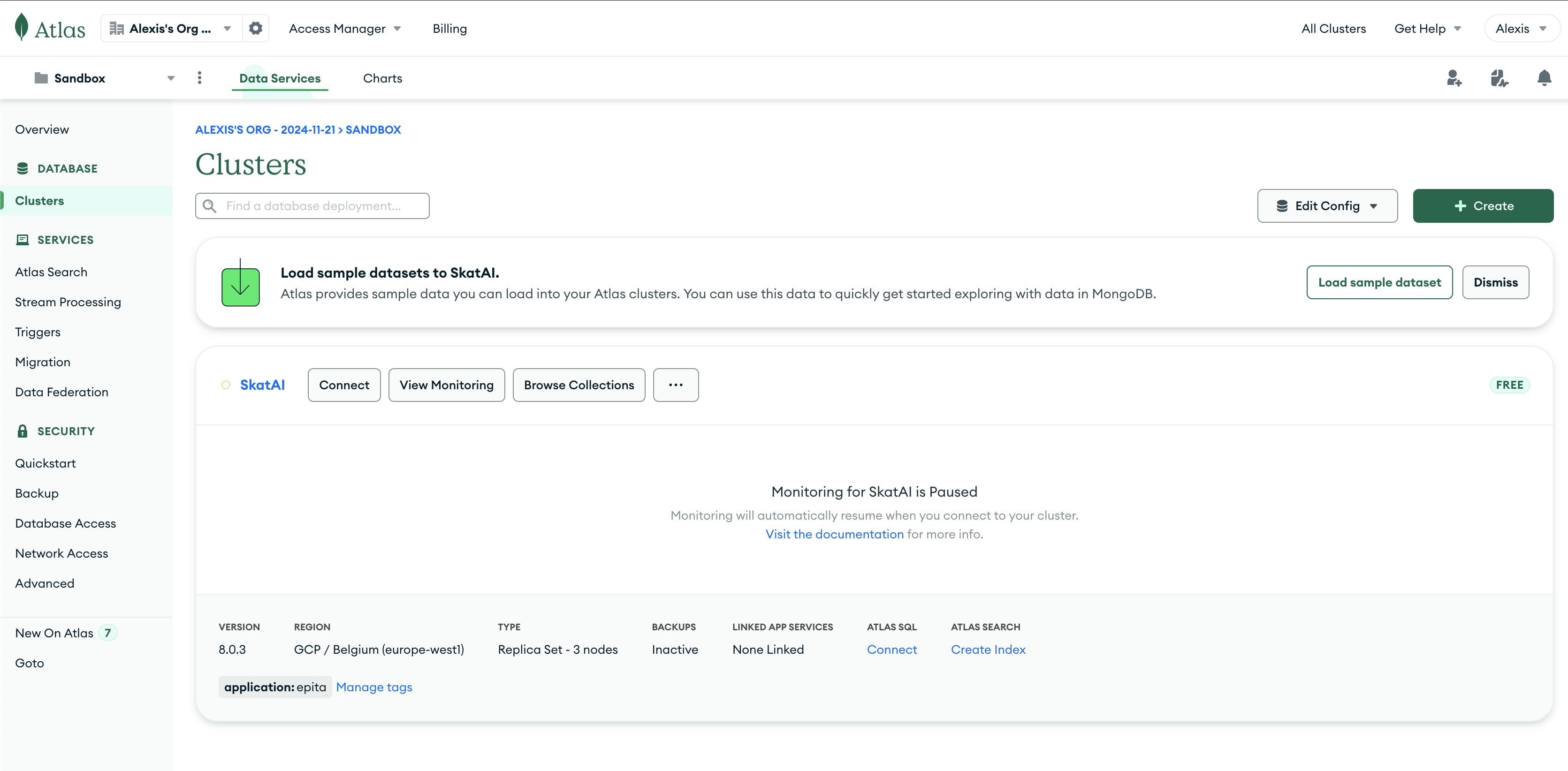
On the next screen
- select the free option (right side)
- and whatever cloud provider you like : Google, AWS or Azure
- select a region (default is ok)
- no need for tags
- Click on "CREATE DEPLOYMENT"
- I called the cluster :
Epita
You can close the "Connect popup". We'll come back to it later.
Important
-
Copy your database password.
-
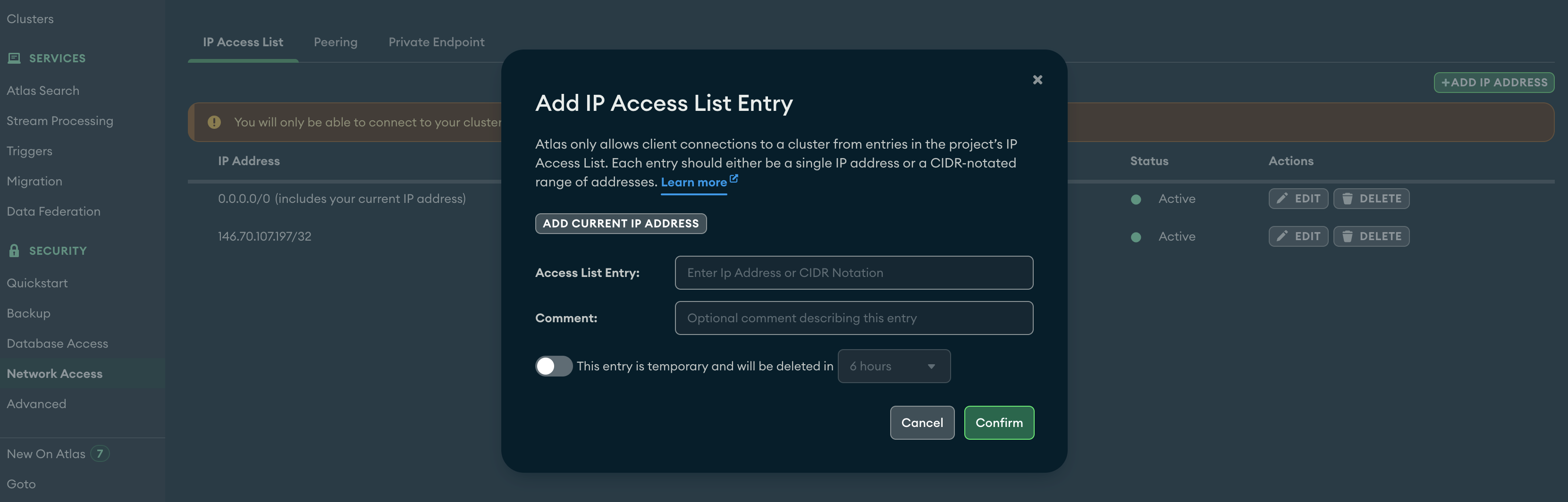
Check that your IP address is authorized. Visit
Network Access(left navigation) and add it to the list -
To allow access from any IP add 0.0.0.0/0. This is not recommended for production but easier for our context.
Create a database
Then create a MongoDB database
- Go to
clusters(left sise) - click on "Browse Collections"
- then "Add my own data"
or in:
- Overview (Left)
- Add data (center)
- Create Database on Atlas
with following info
- database name:
songsdb - collection name
songs - no additional preferences
Note: do not confuse
- the project:
Sandbox(already preset) - the database:
songsdb - the collection (table):
songs
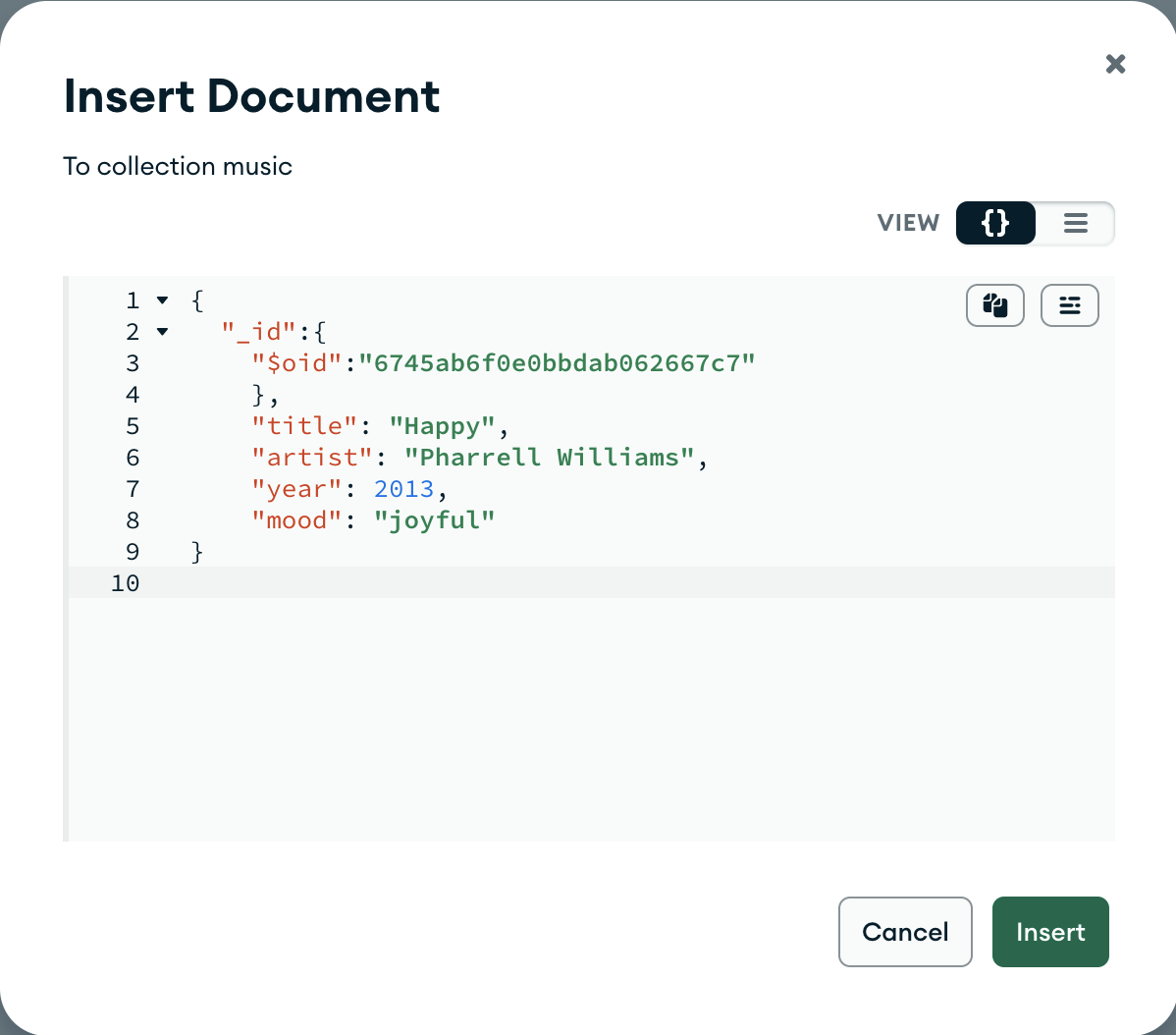
Then insert the following Document (right side : INSERT DOCUMENT)
- click on {} (right side) to indicate you want to insert a document as JSON
you can delete the existing _id
{
  "_id":{
    "$oid":"6745ab6f0e0bbdab062667c7"
    },
    "title": "Happy",
    "artist": "Pharrell Williams",
    "year": 2013,
    "mood": "joyful"
}
And insert another one
{
  "_id":{
    "$oid":"682edb5c5ee7135cebb21b2f"
  },
  "title": "Galvanize",
  "artist": "The Chemical Brothers",
  "year": 2004,
  "mood": "electric"
}
In both cases, the value of the _id is arbitrary. The tool proposes a default one with another value.
We now have 2 documents!
2 documents, WOOOOOO! exciting 🤣🤣🤣 !
Let's explore this magnificent MongoDB database.
Queries in MongoDB
In MongoDB, writing a query comes down to writing JSON
| json | query |
|---|---|
{} | returns all documents |
{ field : value } | where field = value |
{ field : { $lt : value } } | where field <= value (lt : less than) |
To return all the documents in our songs collection, just write {} in the "Filter" query field
This returns the 2 songs, the 2 documents.
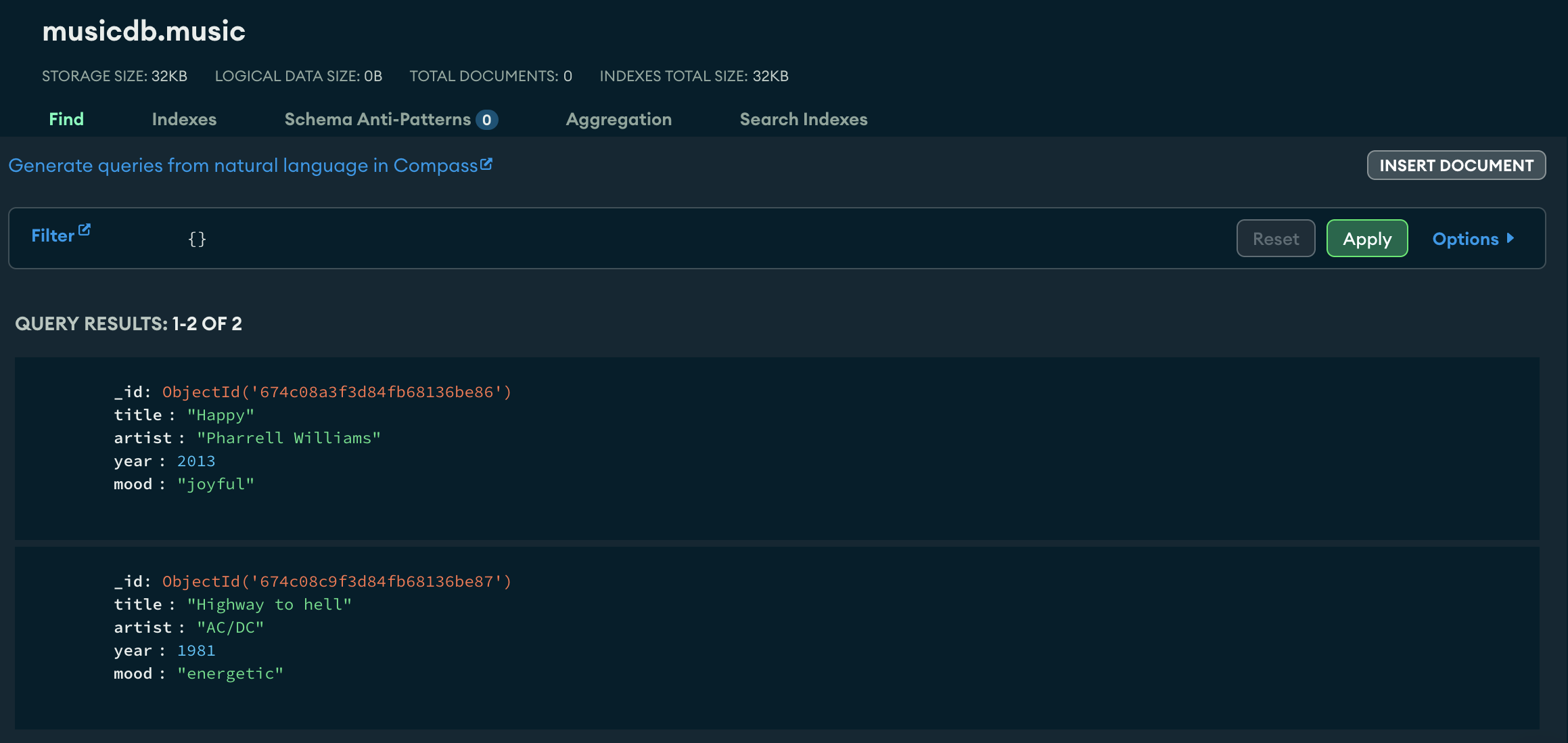
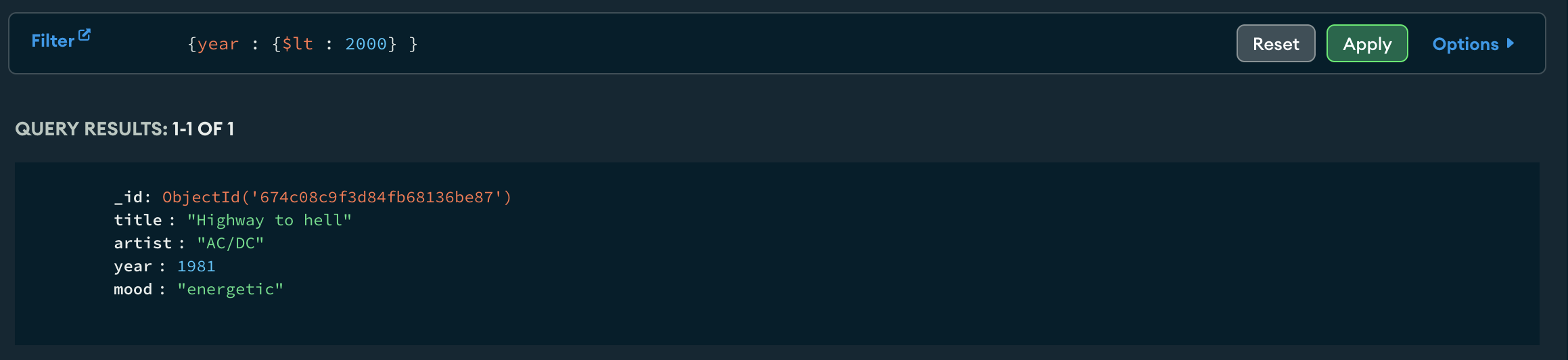
And the query {year : {$lt : 2010}} returns the song that was published before 2010.
Moaaaaaarrrr data!!!

2 documents is good but we need more data to really play.
Let's now import the sample datasets provided by ATLAS.
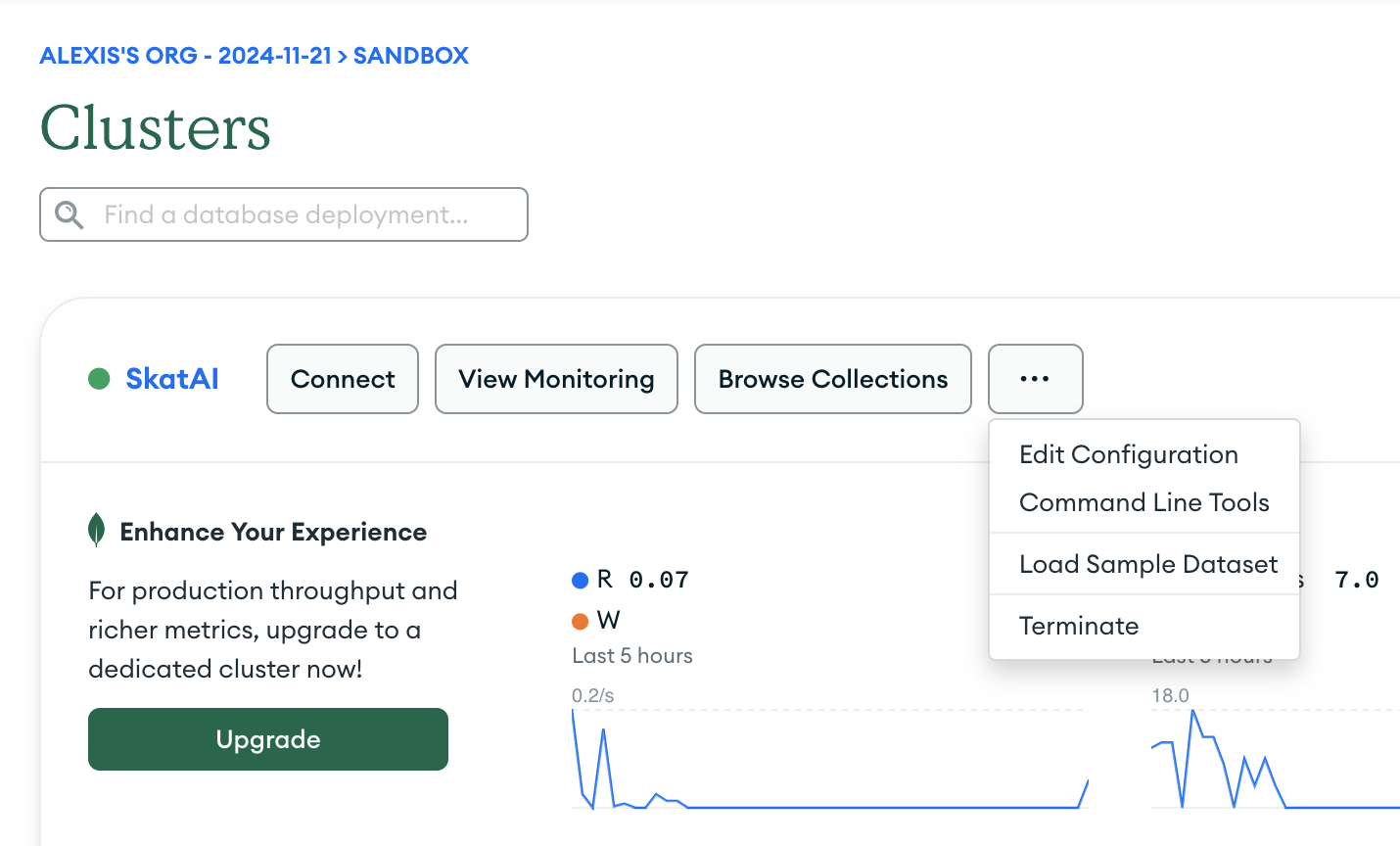
Note: it may be already loaded. Check in Clusters > Browse Collections.
If you do not see the database sample_mflix in the collection list then load it.
Go to Clusters > dots > load sample dataset
Keep everything or just select sample_mflix (may be faster)
⏳⏳⏳
Then click on Clusters) > Browse collections to see the available databases.
You get a new database movies_mflix with 5 collections.
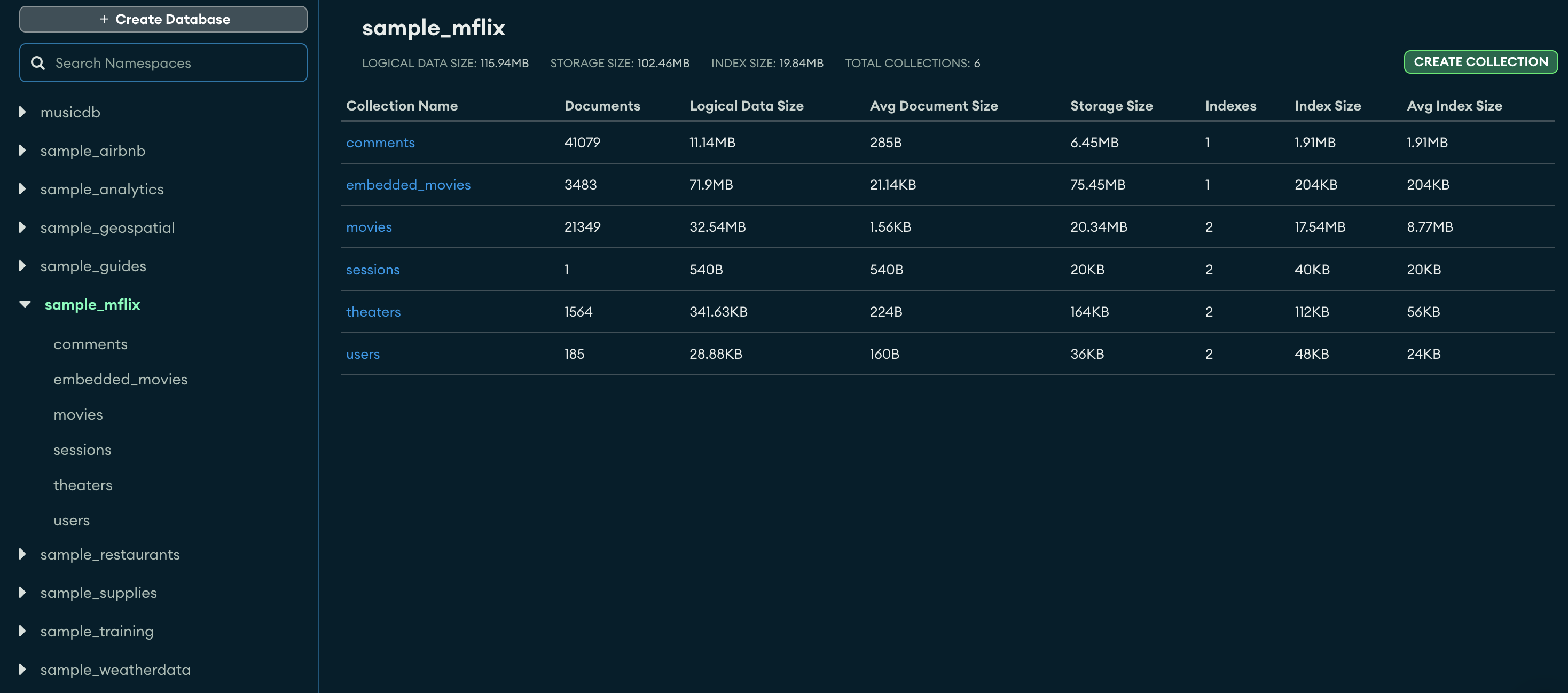
Let's look at the embedded_movies collection which contains 1525 documents and observe the structure of a document
A document is a JSON record
It can have:
- nested JSON: look at the nested dictionaries
imdbandtomatoesfields. - arrays: look at genres, cast, languages, writers, ...
The primary key of a collection is always "_id".
{
    "_id": {
        "$oid": "573a1390f29313caabcd5293"
    },
    "plot": "Young Pauline is left a lot of money when her wealthy uncle dies. However, her uncle's secretary has been named as her guardian until she marries, at which time she will officially take ...",
    "genres": [
        "Action"
    ],
    "runtime": {
        "$numberInt": "199"
    },
    "cast": [
        "Pearl White",
        "Crane Wilbur",
        "Paul Panzer",
        "Edward Josè"
    ],
    "num_mflix_comments": {
        "$numberInt": "0"
    },
    "poster": "https://m.media-amazon.com/images/M/MV5BMzgxODk1Mzk2Ml5BMl5BanBnXkFtZTgwMDg0NzkwMjE@._V1_SY1000_SX677_AL_.jpg",
    "title": "The Perils of Pauline",
    "fullplot": "Young Pauline is left a lot of money when her wealthy uncle dies. However, her uncle's secretary has been named as her guardian until she marries, at which time she will officially take possession of her inheritance. Meanwhile, her \"guardian\" and his confederates constantly come up with schemes to get rid of Pauline so that he can get his hands on the money himself.",
    "languages": [
        "English"
    ],
    "released": {
        "$date": {
            "$numberLong": "-1760227200000"
        }
    },
    "directors": [
        "Louis J. Gasnier",
        "Donald MacKenzie"
    ],
    "writers": [
        "Charles W. Goddard (screenplay)",
        "Basil Dickey (screenplay)",
        "Charles W. Goddard (novel)",
        "George B. Seitz",
        "Bertram Millhauser"
    ],
    "awards": {
        "wins": {
            "$numberInt": "1"
        },
        "nominations": {
            "$numberInt": "0"
        },
        "text": "1 win."
    },
    "lastupdated": "2015-09-12 00:01:18.647000000",
    "year": {
        "$numberInt": "1914"
    },
    "imdb": {
        "rating": {
            "$numberDouble": "7.6"
        },
        "votes": {
            "$numberInt": "744"
        },
        "id": {
            "$numberInt": "4465"
        }
    },
    "countries": [
        "USA"
    ],
    "type": "movie",
    "tomatoes": {
        "viewer": {
            "rating": {
                "$numberDouble": "2.8"
            },
            "numReviews": {
                "$numberInt": "9"
            }
        },
        "production": "Pathè Frères",
        "lastUpdated": {
            "$date": {
                "$numberLong": "1441993579000"
            }
        }
    }
}
The ATLAS user interface is well done but I prefer working with code rather than a web interface.
Let's move to mongosh to explore this movie database and learn how to make queries in MongoDB.
Connecting via your language
Atlas allows you to connect to your cluster either with a driver for your favorite language (python, ...) or with the shell.
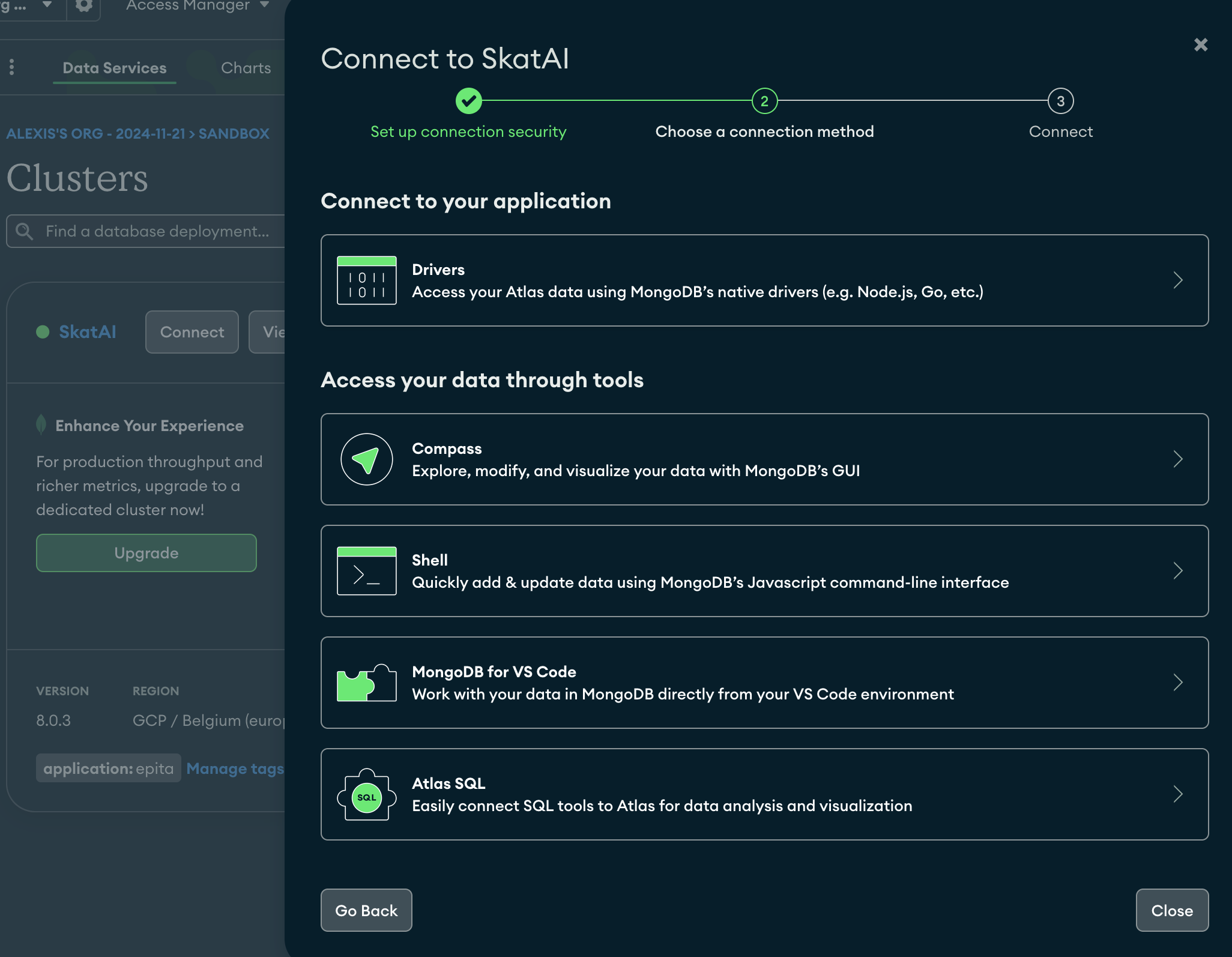
Connecting with Mongosh
Save the connection string in an environment variable
mongodb+srv://<username>:<password>@<cluster_id>.mongodb.net/
For example
export MONGO_ATLAS_URI=mongodb+srv://<username>:<password>@<cluster_id>.mongodb.net/
Then connect with
mongosh ${MONGO_ATLAS_URI}
Connecting in Python
We need the pymongo package
pip install pymongo
The connection string is
connection_string = "mongodb+srv://<username>:<db_password>@<cluster_id>.mongodb.net
Note: If you work in python, it's better to put the connection string as an environment variable ($MONGO_ATLAS_URI), in a .env file. then load it with dotenv
import os
from dotenv import load_dotenv

load_dotenv()

MONGO_ATLAS_URI = os.getenv('MONGO_ATLAS_URI')
And then instantiate the client with
from pymongo import MongoClient

client = MongoClient(MONGO_ATLAS_URI)
Once we have a client, we can connect to the database
db = client["sample_mflix"]
then instantiate a collection
collection = db["movies"]
The collection is of class pymongo.synchronous.collection.Collection and has many methods:

You cna then work directly in a python script file, in a Jupyter notebook (Google Colab, local) or in your terminal with iPython.
Using the terminal with mongosh
How to install mongosh: https://www.mongodb.com/docs/mongodb-shell/install/
The language used in the MongoDB shell (mongosh) is JavaScript.
mongosh is an interactive JavaScript interface for MongoDB, allowing you to interact with your MongoDB instances, execute queries or perform administrative tasks in JavaScript.
mongosh also supports many JavaScript features including the use of variables, loops and functions.
Here are some examples of using JavaScript in mongosh:
- Connect to a MongoDB instance:
Local
mongosh "mongodb://localhost:27017"
On Atlas
mongosh ${MONGO_ATLAS_URI}
where
export MONGO_ATLAS_URI=mongodb+srv://<username>:<password>@<cluster_id>.mongodb.net/
Once connected to an instance
- see the databases:
show dbs
returns
Atlas atlas-a12t6r-shard-0 [primary] test> show dbs
sample_mflix  126.52 MiB
songsdb        72.00 KiB
admin         348.00 KiB
local           3.20 GiB
- Change database:
use sample_mflix
!! Attention !! If you try to use a database that does not exist, no error is raised.
- see the collections:
show collections
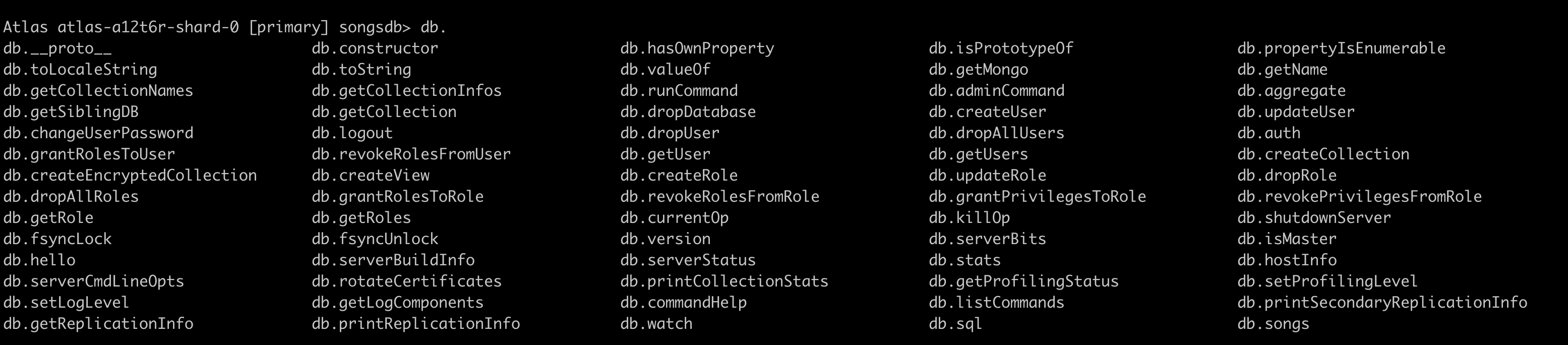
- db function
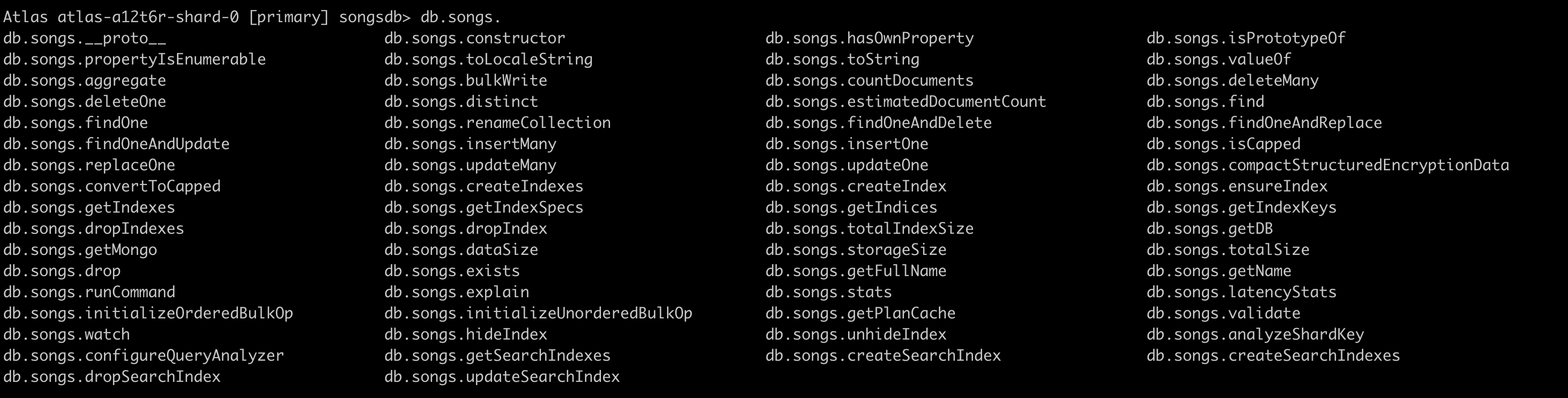
- db.collection function
- Insert a document
db.songs.insertOne(
    {
        "title": "Green Onions",
      "artist": "Booket T and the MGs",
      "year": 1967,
      "mood": "[blues, soul]"
  }
)
- Update a document
db.users.updateOne(
{ "artist": "Booket T and the MGs" },
{ $set: { "artist": "Booker T and the MGs" } }
);
- Query
db.songs.find({ year: { $lt: 2010 } })
- Delete a document:
db.songs.deleteOne({ title: "Green Onions" })
- Mongosh + Javascript
Work with the whole javascript language in mongosh
You can set variables for instance
var  max_year= 2010;
db.songs.find({ year: { $lt: max_year }})
- execute scripts with mongosh
mongosh < script.js
or
mongosh --file script.js
and within a mongosh session
> load('path/to/script.js')
mongosh is a powerful tool for querying and managing your MongoDB databases.
Let's switch to the sample_mflix database.
use sample_mflix
then
show collections
Difference between queries in python and javascript
python: double quotes around fields and operators
db.movies.find(
    {"runtime": {"$gt" : 180}},  // Filter on movie duration
    { "_id": 0, "title": 1, "runtime": 1, "imdb.rating": 1 }  // Projection to include title and imdb.rating, exclude _id
)
mongosh: no need for quotes
db.movies.find(
    {runtime: {$gt : 180}},  // Filter on movie duration
    { _id: 0, title: 1, runtime: 1, "imdb.rating": 1 }  // Projection to include title and imdb.rating, exclude _id
)
Filtering - query predicate
https://www.mongodb.com/docs/manual/reference/glossary/
The JSON clause that specifies the filtering arguments is called a query predicate.
A query predicate returns a boolean that indicates whether a document matches the specified query.
-
An empty query predicate (
{ }) returns all documents in the collection. -
{ title: { $eq: "Top Gun" } }, which returns documents that have a "title" field whose value is "Top Gun".
Main functions on collections
| function | returns |
|---|---|
find() | all documents |
find_one() | the 1st document |
distinct("<field>") | list of distinct values for the <field> |
count_documents({}) | number of documents for the collection or returned by the filter in the query predicate |
Also note
-
find_one_and_replace() -
find_one_and_update()and -
delete_many() -
delete_one() -
drop_index() -
etc ...
You can chain these methods with limit and sort
db.movies.find({runtime: {$gt: 120}}).limit(3)
Cursor
The result of a find query is a cursor.
cursor = db.movies.find({})
A cursor is a pointer to a MongoDB query result set.
Projection
In database language, projecting means selecting a subset of all possible fields.
In SQL, you simply list the column names
select genres, plot from movies;
In MongoDB, you must specify the fields in a JSON object, right after the query predicate
db.movies.find(
    {runtime: {$gt : 180}},  // Filter on movie duration
    { _id: 0, title: 1, runtime: 1, "imdb.rating": 1 }  // Projection to include title and imdb.rating, exclude _id
)
Here the projection is expressed by: ({ _id: 0, title: 1, runtime: 1, "imdb.rating": 1 })
title: 1: includes the title field.runtime: 1,includes the runtime"imdb.rating": 1: Includes theimdb.ratingfield._id: 0: Excludes the_idfield from the result (the default value is 1 if not specified).
The query returns
{ runtime: 240, title: 'Napoleon', imdb: { rating: 7.4 } },
{ runtime: 281, title: 'Les Misèrables', imdb: { rating: 7.9 } },
{ runtime: 245, title: 'Flash Gordon', imdb: { rating: 7.3 } },
{ runtime: 238, title: 'Gone with the Wind', imdb: { rating: 8.2 } },
...
Number of documents
db.movies.countDocuments({ "imdb.rating": { $gt: 8.0 } })
Notice how we query the embedded fields : "imdb.rating"
Your turn
Write the filter and projection for the following queries
- use projection to return only relevant fields or at minimum "title"
- limit results to 5 documents
- or return the number of documents with
db.movies.count_documents(filter)
- Find movies with an IMDb rating greater than 8
- filter:
{"imdb.rating": {"$gt" : 8}} - projection:
{"_id": 0, "title": 1, "imdb.rating": 1}
- filter:
- Movies released after 2000
- Movies with a specific director: "Christopher Nolan". Show title, director and year
- Retrieve movies with
tomatoes.viewer.rating > 4.0, showing title and viewer rating. - Find movies that contain
"Comedy"and"Drama"in thegenresarray. Use{$all: [list of genres]} - Find movies that contain
"Comedy"OR"Drama"in thegenresarray. Use{$all: [list of genres]} - Movie query on a year range: Retrieve movies released between 1990 and 2000, showing title and year.
- Movie query with missing fields: Find movies where the
fullplotfield does not exist. Use$exists. - Find all distinct genres
- use
db.movies.distinct("genres")
- top 5 most frequent genres
- use the
$unwindoperator in combination withe$groupoperator
 {"$unwind": "$genres"},
 {"$group": {"_id": "$genres", "count": {"$sum": 1}}},
Conclusion
In this session you practiced:
-
Setting up MongoDB Atlas, a cloud-hosted database service, including cluster creation and security configuration
-
Writing basic MongoDB queries using JSON format:
- Basic syntax:
{}for all documents,{field: value}for equality,{field: {$lt: value}}for comparisons - How to query nested fields and arrays in complex documents
- Basic syntax:
-
Connecting to MongoDB Atlas using Python and
pymongo:- Using basic operations:
find(),find_one(),distinct(),count_documents() - Implementing projections to select specific fields
- Using basic operations:
-
Working with sample datasets (particularly the movies database) to practice:
- Filtering and sorting data
- Working with nested fields
- Using operators like
$gt,$lt,$all,$exists - Writing combined queries with multiple conditions
In the next session, we will dive deeper into MongoDB and look at more complex ways to query data using aggregation pipelines. We will also cover schema design and validation.
To go further
For next time, you can:
- explore more Atlas sample databases and practice writing queries
- follow https://www.mongodb.com/docs/languages/python/pymongo-driver/current/read/ for more practice
- There are many free courses and tutorials in MongoDB University
and many more